
Two moves stop most automatic reminder emails: click the unsubscribe or "stop receiving notifications" link at the bottom of the reminder itself, or sign in to your account and switch reminders off under Settings → Notifications → Email/Reminders. Many services also let you unsubscribe from a single document, event, or appointment without touching every other notification.
- Click the unsubscribe link in the footer of the reminder email
- Or sign in and toggle Email/Reminders to Off in your notification settings
- Check for a per-item unsubscribe link if it's tied to one document, event, or appointment
You'll cut inbox noise without losing notices you actually need, like payment confirmations or game changes.
Pro Tip: If a reminder keeps showing up after you've unsubscribed, check your phone's app notification settings and make sure you're not signed in to a second account or alternate email address getting the same message.
Key Takeaways
Stopping automatic reminders almost always comes down to two moves: the footer unsubscribe link for marketing-style messages, and the account-level Notifications toggle for anything transactional.
| Point | Details |
|---|---|
| Try the footer link first | Click unsubscribe or "stop receiving notifications" in the reminder email before digging into account settings. |
| Transactional needs a toggle | Service-critical reminders like appointments or documents usually require a Settings → Notifications change, not a footer click. |
| Check per-item controls | Documents, events, and appointments often carry their own reminder toggle separate from your account-wide setting. |
| Confirm the actual sender | Search your inbox for the exact sender address since multiple accounts or alternate emails often cause repeat reminders. |
| Ask before you assume broken | If reminders persist, contact the organizer's admin dashboard directly instead of retrying the same unsubscribe link. |
Table of Contents
- Why do automatic reminders keep showing up?
- What's the fastest way to unsubscribe from reminders?
- How do you stop reminders on specific platforms?
- If you send reminders, how do you turn them off for others?
- Why do reminders keep coming after you unsubscribe?
- How do you undo an accidental unsubscribe?
- What's the smarter long-term fix for notification overload?
- A quick word on managing your own notification habits
- Where to check exact steps for your platform
- Frequently Asked Questions
- Sources
Why do automatic reminders keep showing up?
Most reminders aren't sent from a mailing list. They fire from an automation triggered by a data point, like an event date, a due date, or a tag on your account. Mailpro explains that automated reminders react to a field on your profile or transaction and repeat every time that condition is met, while a one-time scheduled campaign just sends once and stops.
That difference matters because platforms often classify these messages as transactional rather than marketing. A reminder about a signed document, a scheduled appointment, or an upcoming game isn't treated the same as a promotional newsletter, so a footer unsubscribe link may not touch it at all.
- Event-triggered automations: reset by the date field, not a list
- Transactional reminders: often live in account settings, not the footer link
- Cadence: many systems send an initial reminder, then one or two follow-ups, continuing until the triggering event passes or you turn the automation off
What's the fastest way to unsubscribe from reminders?
- Open the reminder email and scan the footer for an unsubscribe or "stop receiving notifications" link. Click it and confirm on the page that follows.
- Sign in to the account sending the reminder and go to Settings → Notifications (sometimes labeled Activity or Reminders) and switch email reminders to Off.
- Check for a per-item toggle. Documents, calendar invites, and single events often carry their own reminder controls separate from your account-wide settings.
- Mute the app on your phone if messages keep landing as push notifications, or use Do Not Disturb or Quiet Hours as a stopgap while you track down the source.
- If reminders persist, search your inbox for the sender's address or the word "reminder" to confirm which account or automation is actually behind it.
Pro Tip: Search your inbox for the exact sender address instead of relying on memory. Multiple services often use nearly identical subject lines, and finding the real sender saves you from unsubscribing in the wrong place.
How do you stop reminders on specific platforms?
Every platform hides its reminder toggle in a slightly different spot. Here's where to look on the ones people search for most.
- Microsoft Teams: Turn off activity summary emails or set channel notifications to "Only in feed" instead of "Banner and feed" to stop the constant pings. Microsoft's own notification guide confirms you can set frequency to Off entirely, and Do Not Disturb silences pop-ups while keeping your Activity feed intact.
- Accelevents: Attendees can unsubscribe from confirmation, reminder, and engagement emails through the link at the bottom of any event message. Accelevents' help center notes you have to also toggle "Notifications from event organizer" off in the pop-up that opens, or the unsubscribe won't fully take.
- RightSignature and similar e-signature tools: Reminders are tied to one agreement. The document owner can cancel reminders for that specific agreement, and ShareFile's documentation confirms signers often get a direct option in the notification email to stop future alerts on that document alone.
- SimplePractice: Clients can unsubscribe from appointment reminders directly, and SimplePractice's support article explains providers can re-enable reminders for a client from that client's Overview page if the unsubscribe was accidental.
- AutoVitals: Auto shop customers can be excluded from service reminder automations when staff mark them in the Vehicle and Driver Directory, separate from any general marketing unsubscribe.
- Mobile and calendar reminders: Check your phone's Calendar app settings for subscribed calendars generating their own alerts. Disabling notifications in the reminder-sending app usually won't stop a calendar subscription pushing its own copy.
If you send reminders, how do you turn them off for others?
Organizers and admins usually have more granular control than recipients realize.
- Look for reminder rules under Campaigns, Automation, or the event/appointment settings, often labeled first, second, and final reminder.
- Pause the automation entirely or edit the cadence so fewer follow-ups go out.
- Exclude a specific recipient by flagging their profile rather than turning reminders off for everyone.
- Manage team-wide notification volume with Roster Sports' game organizer tools, which let you set communication cadence without drowning players in messages.
Pro Tip: Tell recipients before you turn off reminders they're used to getting. A missed appointment or a no-show teammate is a worse problem than one extra email.
Why do reminders keep coming after you unsubscribe?
If you've clicked unsubscribe and toggled every setting you can find but the emails keep landing, work through this:
- Check for a second account or an alternate email address signed up for the same service.
- Confirm whether the message is transactional. Service-critical reminders are often controlled in account or organizer settings, not by a footer link, since Accelevents' terms note that unsubscribing from marketing lists doesn't automatically stop active automations.
- Look at any connected calendar subscriptions or third-party integrations pulling the same event data and regenerating alerts on their own.
- If none of that works, contact the sender directly and ask them to remove you manually from their admin dashboard.
How do you undo an accidental unsubscribe?
Most platforms let you turn reminders back on, though the exact path depends on who controls the setting.
- If a resubscribe link is included in the original message, use it, or sign back into your account and flip Reminders back on under Notifications.
- If you were added to an organizer's suppression list, you typically can't self-serve. Contact the organizer or support so they can remove you from that list.
- Providers using SimplePractice can re-enable reminders for a client directly from that client's profile if the unsubscribe was a mistake.
What's the smarter long-term fix for notification overload?
A feed-first approach works better than an all-or-nothing unsubscribe. Silence pop-ups and check an activity feed on your own schedule instead of reacting to every alert as it lands.
- Use per-channel or per-event exclusions instead of a blanket unsubscribe, so critical reminders still reach you.
- If you're the one sending reminders, set clear expectations about cadence up front. Fewer surprises mean fewer accidental unsubscribes and less frustration on both ends.
- Revisit your notification settings periodically. Apps add new alert types often, and last year's cleanup doesn't cover this year's defaults.
A quick word on managing your own notification habits
Recurring reminders pile up because most of us fix them reactively, one annoying email at a time, instead of clearing them out on a schedule. A BLUF-first approach, where you act on the direct fix before reading the backstory, saves real time over a year of inbox triage.
Set a recurring weekly reminder on your own calendar to review and reconfigure the automations that are actually bothering you.
Where to check exact steps for your platform
Vendor documentation shows the precise Settings path for each tool, since menus shift with updates.
- Accelevents: attendee unsubscribe steps
- Microsoft Teams: notification management
- ShareFile: e-signature reminder settings
- SimplePractice: appointment reminder setup
Frequently Asked Questions
Does clicking unsubscribe stop all reminders from a service? Not always. It typically stops marketing-style emails but may leave transactional reminders, like a payment notice or appointment confirmation, untouched since those are often managed separately in your account settings.
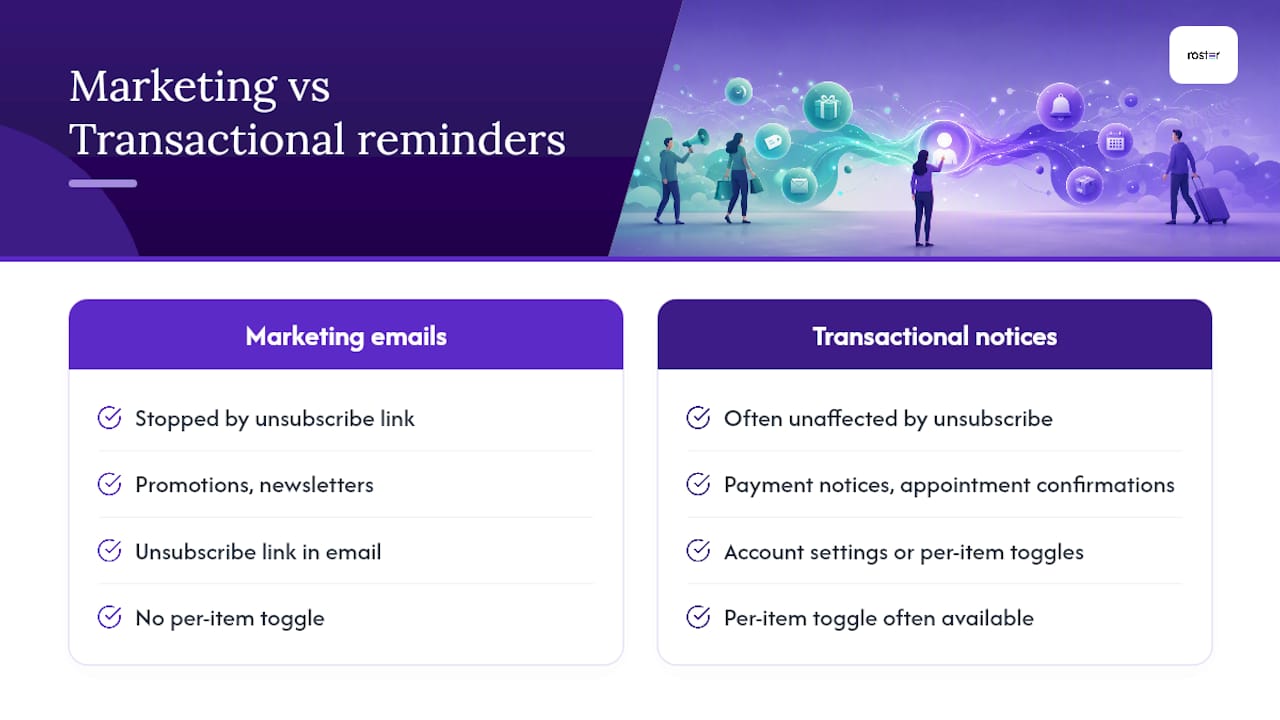
How do I stop reminder emails for one event or document without unsubscribing from everything? Look for a per-item toggle. Signing platforms and event tools frequently let you cancel reminders for a single agreement or event while your account stays subscribed to everything else.
Why do I still get reminders after turning off notifications on my phone? Notification settings are often scoped per-device or per-account. A change on your phone won't necessarily affect your desktop app or a second account signed into the same service.
Can an organizer turn my reminders back on after I unsubscribe? In some cases, yes. Providers and admins on platforms like SimplePractice can re-enable reminders for a specific person from their profile, so it's worth asking the organizer directly if you unsubscribed by mistake.
What if reminders keep coming and I can't find the toggle? Check for alternate accounts, connected calendar subscriptions, or third-party integrations pulling the same data. If nothing works, contact the sender and ask them to remove you manually from their admin dashboard.
Sources
- Can Attendees Unsubscribe From My Event Emails? | Accelevents Help Center
- Send Automated Email Reminders With Mailpro | Mailpro
- Manage notifications in Microsoft Teams
- Setting up appointment reminders – SimplePractice Support
- Reminder emails (ShareFile e-signature docs)