

Pick one trusted channel for logistics, name a single owner for every message that goes out, and run every event through a three-item checklist: who needs to know, how urgent is it, and who confirms it went out. Balancing quick real-time alerts against slower, no-rush updates keeps everyone informed without burying them in notifications. A tool like Roster Sports helps put this into practice by handling the signups, waitlists, and messaging in one place.
TL;DR:
- Communication plans should clearly define owners, channels, and timing for each message, focusing on audience-specific needs to reduce questions and confusion.
- Urgent issues require real-time channels like texts or notifications, while routine updates are best handled through email or shared documents to prevent notification fatigue.
- Game-day messaging must follow a strict timeline with pre-prepared templates, and only one person should authorize each type of notification to avoid conflicting information.
- Coaches need concise, ready-to-use templates and a simple reference sheet, enabling them to communicate effectively without extra preparation.
- Tracking key metrics and regularly updating the plan based on feedback improves engagement and ensures important information reaches the right audience efficiently.
Table of Contents
- Building Your Sports Team Communication Plan Checklist
- Who Needs to Know What: Defining Audiences and Messages
- When to Text and When to Email: Channel Rules That Stop Notification Fatigue
- What to Send on Game Day (and Who's Allowed to Send It)
- Give Coaches Ownership With Templates They Don't Have to Write
- Is Your Plan Actually Working? Measuring and Improving It
- Keeping Kids' Information Private in Team Communications
- Where This Actually Works (and Where It Falls Apart)
- How Roster Sports Puts This Checklist Into Practice
- Sources
Building Your Sports Team Communication Plan Checklist
A communication plan for a sports team doesn't need a binder. It needs a list you can run through in ten minutes before the season starts and again before every game.
Start with a short preseason survey. Ask parents and players how they want to hear from you and how often. Pre-season buy-in like this cuts down on mid-season conflicts over missed messages before it starts. From there, build the rest of your plan around what you learned.
- Set one primary channel (team app or group text) and one backup for emergencies
- Assign an owner for schedule changes, one for logistics, one for parent questions
- Set a response-time expectation and write it down somewhere everyone can see it
- Build a five-item game-day checklist: reminder, location, arrival time, cancellation status, contact
- Close the season with a wrap-up message thanking volunteers and outlining next steps
Pro Tip: Print your checklist and tape it inside your equipment bag. The teams that stick to a plan are the ones that can see it without opening an app.
Who Needs to Know What: Defining Audiences and Messages
Not every message belongs to every inbox. Players need practice times and drills. Parents need logistics, pickup windows, and payment reminders. Coaches need roster changes and injury updates before anyone else. Volunteers need shift confirmations. Sponsors need recognition, not roster gossip.
A solid communication strategy defines the audience, the message, the timing, and who owns it before a single text goes out, which is exactly what cuts down on repeated questions. Write every message with a three-line structure:
- What: the fact (practice moved to 6 p.m.)
- Why: the reason, if it matters (field maintenance)
- Action: what the reader does next (arrive by 5:45)
Collect channel and frequency preferences right at registration, not halfway through the season. Ask a single question on the sign-up form: "How do you want to hear from us, and how often?" That one line saves weeks of guessing later, and it lets you segment messages instead of blasting everyone with the same notification.
When to Text and When to Email: Channel Rules That Stop Notification Fatigue
Synchronous communication means real-time, expect-a-reply-now: a phone call, a text thread, a live chat during a game delay. Asynchronous means the message sits until the reader has a spare minute: email, an app announcement, a shared schedule doc. Mixing these up is the fastest way to burn out your group chat.
The rule is simple. Reserve synchronous channels for genuinely urgent issues like a last-minute cancellation, and default to asynchronous methods for anything routine. A practice-time reminder does not need a group text blast at 10 p.m.
Map urgency to channel with a short list:
- Immediate/safety (weather delay, injury, cancellation) → text or push notification, confirm receipt
- Time-sensitive but not urgent (lineup change, field switch) → app announcement, no reply expected
- Routine (schedule, standings, volunteer sign-ups) → email or shared doc, checked on the reader's own time
Publish your response-time expectation once and stick to it. For example, urgent texts should be replied to quickly during game hours, while less urgent messages can have longer response times. Documenting the decision this clearly means nobody has to ask twice, which is where most volunteer burnout actually starts.
What to Send on Game Day (and Who's Allowed to Send It)
Game day is where a communication plan either earns its keep or falls apart. Build a simple timeline: reminder 24 hours out, confirmation the morning of, and a final "we're on" or "we're delayed" push 60 to 90 minutes before first whistle.
Cancellations need a template ready before you need it, not written in a panic in the parking lot. Something like: "Practice canceled today due to [reason]. Next session: [date/time]. Questions to [owner]." One person authorizes it, one channel sends it, and everyone else forwards or confirms, they don't improvise their own version.
- Pre-game reminder 24 hours out (owner: team manager)
- Weather/field-status check 90 minutes before start (owner: on-site coach)
- Cancellation or delay notice, sent the moment the call is made
- On-site score updates and any safety notes, posted after the final whistle
Keep the authorization chain to one person per decision. Two people sending conflicting cancellation notices is worse than sending none at all.
Give Coaches Ownership With Templates They Don't Have to Write

Coaches are busy running practice, not drafting emails. Give them a role matrix that says exactly what falls on their plate: lineup changes and injury reports, yes; payment reminders and sponsor thank-yous, no. Someone else owns those.
Hand every coach three canned templates they can copy and send in under a minute:
- "Practice moved to [time/location] due to [reason]. See you there."
- "[Player] will miss [date] due to [reason, if shareable]. Lineup adjusted."
- "Great game today. Final score [X]. Next practice [date/time]."
A one-page coach reference sheet, primary channel, backup channel, who to call for what, turns a 30-minute onboarding conversation into a five-minute read. New coaches should be able to run their first practice communication without asking a single question.
Pro Tip: Laminate the one-page reference and hand it out at the first coaches' meeting. It's the cheapest training tool you'll ever make.
Is Your Plan Actually Working? Measuring and Improving It
Track four numbers: open or read rate on announcements, attendance at practices and games, average response time to urgent messages, and returning-player rate season over season. If read rates drop mid-season, your channel or frequency is off, not your content.
Run a two-question pulse survey at the halfway mark: "Are you getting the information you need?" and "What channel do you actually check?" Five minutes, real answers.
- Confirm final standings and results went out to everyone
- Thank volunteers and coaches by name where possible
- Send next-season registration info while people are still engaged
- Archive templates and lessons learned for next year's board
- Ask what channel worked best and adjust the default
- Note any recurring complaint and fix it before the next opener
A missing end-of-season closeout is one of the most common gaps in youth sports communication, and it's often the easiest one to fix.
Keeping Kids' Information Private in Team Communications
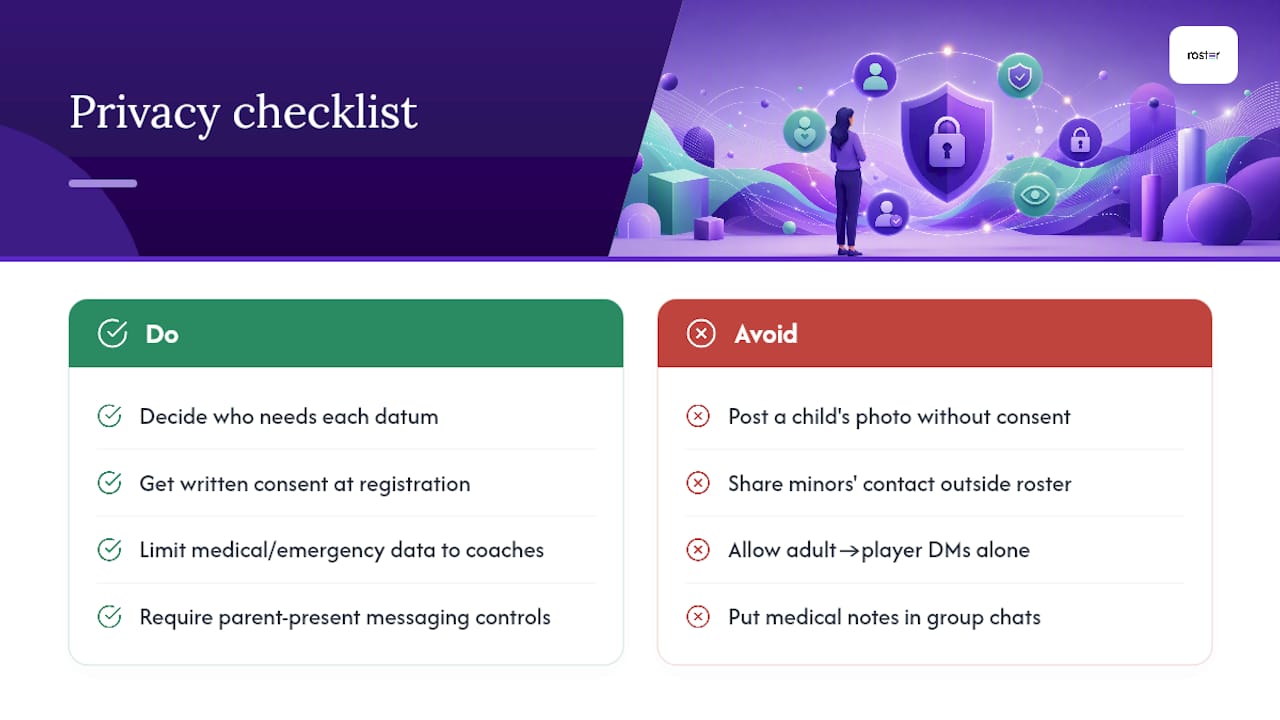
Youth sports communication almost always involves data that deserves more caution than a normal group chat: a minor's schedule, location, photo, or medical note. Before you build any channel list, decide who actually needs access to that information and who doesn't.
Get written consent at registration for anything beyond basic logistics, specifically photo and video use, medical information sharing among coaches, and any third-party tool that stores player data. A simple checkbox on your sign-up form covering these three items covers most of what a youth organization needs, though local youth sports associations sometimes add their own requirements worth checking.
Keep medical and emergency contact information limited to coaches and designated safety officers, not the full parent group chat. A severe allergy or asthma note belongs in a coach's private reference, not a thread forty parents can scroll through.
Photos and videos need their own rule. Some parents don't want their child's image posted publicly, even in a team newsletter or social post. Ask at registration, track the answer, and honor it every time, not just for the first post of the season.
Group chats and team apps that include minors should stick to a policy: no direct messaging between adults and players without a parent included, and no sharing of a minor's contact information outside the roster system. This isn't just good practice, it's the kind of baseline that protects both families and the volunteers running the program. When a platform lets you manage this at the account level rather than trusting every parent to remember the rule, it removes a real point of failure.
Where This Actually Works (and Where It Falls Apart)
Most communication plans fail for a boring reason: they get written once, in August, and never looked at again. The teams that actually stick to their checklist are the ones who treat it as a living document, adjusted after the first cancellation goes sideways or the first parent says they never saw the practice change.
The overlooked piece is ownership, not tools. A team with a clunky group text and one clear owner for cancellations will outperform a team with a slick app and no assigned decision-maker every single time. Software fixes the mechanics; it doesn't fix a plan nobody assigned to anyone.
What surprises most first-time organizers is how much friction disappears once you stop trying to keep everyone equally informed about everything. Segmenting your audience, so parents get logistics and coaches get roster details, does more for reducing notification fatigue than any channel switch ever will.
— Daniel
How Roster Sports Puts This Checklist Into Practice
Everything above works better with the right tool behind it, and that's exactly the gap Roster Sports fills. Instead of juggling a group chat, a separate sign-up sheet, and a manual waitlist, you set the game details once, share a single link, and let the game management app handle the rest.

Here's the checklist item it automates best: when a game gets canceled or a spot opens up, Roster fills it from the waitlist in real time instead of you texting six people to see who can make it last minute. Signups, cancellations, and roster spots update automatically, so the "who confirms it went out" step from your checklist basically runs itself.
If you're an adult pickup sports organizer tired of chasing RSVPs across three different threads, the sports game organizer app is built specifically for that job. Set up your next game and see how much of your checklist runs on its own.