

A working game invite message names the sport and format, gives the exact date, time, and location, states how many spots are open and what positions or skill level you need, links to sign-up or explains how to RSVP, spells out the cost and payment method, and sets a confirmation deadline. Cap it with one clear action, like "RSVP here" or "Reply 'in.'" Skip any piece and you'll spend your week chasing replies instead of playing.
TL;DR:
- The opening sentence must clearly state the sport, date, location, open spots, and how to RSVP, with the first line explicitly prompting a decision.
- Send invites four to seven days in advance for casual games and up to two weeks for league or paid events, with reminders at 48 hours, 24 hours, and two hours before start.
- Use short, bullet-point-style messages for higher response rates, with templates tailored for SMS, group chat, or email that include all necessary details and a clear call to action.
- Automate waitlist management, confirmation deadlines, and payment tracking with tools like Roster Sports to reduce admin time and improve roster fill rates.
- Personalize invites for core players, enforce deadlines consistently, and utilize one streamlined link to handle RSVPs, waitlists, and payments, minimizing manual follow-up efforts.
Table of Contents
- What Should Every Game Invite Message Include?
- When Should You Send the Invite and Follow-Up Reminders?
- Ready-to-Send Templates for SMS, Group Chat, and Email
- How Do You Handle Signups, Alternates, and No-Shows?
- How Roster Sports Turns This Checklist Into One Link
- What I've Learned Running Pickup Games for Years
- Try Roster Sports for Your Next Game
- Sources
What Should Every Game Invite Message Include?
A pickup invite fails for one of two reasons: it's missing a detail someone needs to say yes, or it buries that detail in three paragraphs nobody reads. Closed, invite-only games with a clear yes/no ask consistently get more reliable responses than open group posts that leave players guessing.
Here's what belongs in every message, no exceptions:
- Sport and format: "5v5 soccer," "coed volleyball, 6 per side," not just "game tonight."
- Date, time, and exact venue: full address or a map link, not "the usual spot" (new players don't know where that is).
- Spots and skill notes: "Need 3 more, intermediate level" tells someone instantly if they fit.
- Cost and payment method: $8 via Venmo @yourhandle, cash at the field, or a prepay link. Name the payer and the method in one breath.
- RSVP mechanics: a roster link is faster than "reply if you're in," but either works as long as you state the deadline.
- A first line that forces a decision: open with "Need 2 for Thursday 7pm pickup soccer" instead of "Hey everyone, hope you're doing well."
That first line matters more than people think. A subject or opening sentence that states the sport, day, and open spots gets read and acted on; a friendly greeting gets scrolled past. Save the pleasantries for the reply.
When Should You Send the Invite and Follow-Up Reminders?
Timing decides whether you're filling a roster calmly or scrambling at 6 PM for a 7 PM game. The right window depends on how casual the game is:
- Casual weekly pickup: send the invite 4 to 7 days out. Regulars already know the drill, so you're mostly confirming, not recruiting.
- League games or anything with a fee: send 7 to 14 days ahead. Paid slots need more lead time for people to plan and pay.
- Confirmation deadline: close it 48 to 72 hours before start. This gives you room to promote a waitlist player if someone bails.
- Reminder cadence: send at 48 hours, again at 24 hours, then a short game-day nudge 2 hours before kickoff.
- Match the channel to the moment: SMS for the day-of nudge, group chat for the initial call, email for anything involving payment or waivers.
Pro Tip: Set your reminders once at the start of the season instead of typing them every week. A recurring 48-hour and 24-hour send costs you thirty seconds to schedule and saves hours of manual follow-up over a ten-game season.
Ready-to-Send Templates for SMS, Group Chat, and Email
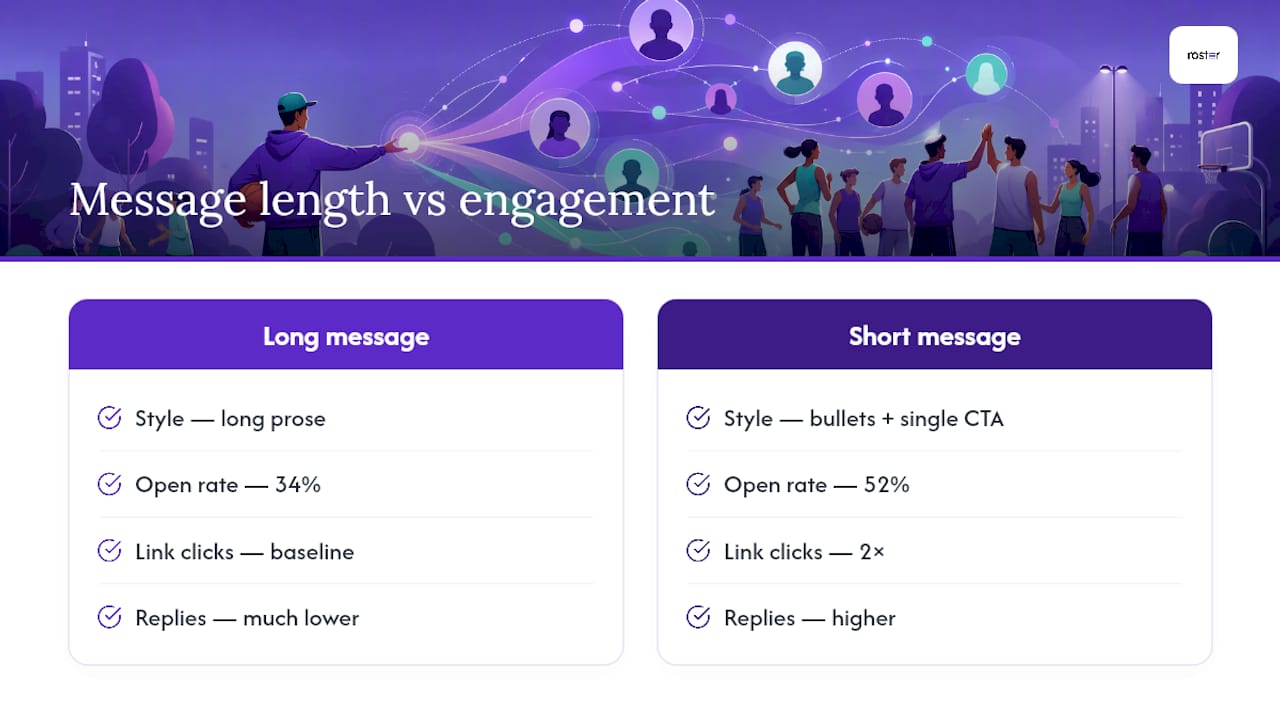
Keeping a message under 150 words with bullet points and a single call to action isn't just tidy. One tested league moved to shorter, bullet-style messages and saw open rate jump from 34% to 52%, with link clicks doubling. Length kills replies faster than almost anything else.
Ultra-short SMS (last-minute or small groups): "Pickup soccer Thu 7pm @ Riverside Field. Need 2. $8 Venmo @yourhandle. In? Reply Y or [link]."
Group chat pinned post: "📍 Thursday Pickup Soccer Riverside Field, 7:00 to 8:30 PM Need: 3 more (any level) Cost: $8, Venmo @yourhandle RSVP by Wed 6 PM: [roster link] First come, first locked in."
League email (with payment and waiver): Subject: "Action needed: confirm your spot for Saturday's game (deadline Thursday)" Body: sport, date, time, address, cost breakdown, waiver link if required, and the roster link. Close with one line: "Confirm by Thursday 6 PM or your spot goes to the waitlist."
Alternate/waitlist promotion: "Good news, a spot opened up for Saturday's 10 AM game at Central Park Field 3. You're next on the list. Reply by 8 PM tonight to lock it in, or it goes to the next name."
Emoji in the subject line (📅, ⚽, 🏐) can raise open rates on a phone screen, but use one, not four. A subject that reads "Action needed" or "Spot open" outperforms a generic "Game this week" every time because it tells the recipient there's something to actually do.
If you're organizing something more specialized, like a pickleball pickup session, the same structure holds. Only the terminology changes.
How Do You Handle Signups, Alternates, and No-Shows?
The invite gets people interested. What happens after determines whether your roster is actually full on game day. Run it like a short checklist, not a guessing game:
- Automate the waitlist if you can; if you're doing it manually, timestamp every reply in one running list, never scattered across three chat threads.
- Enforce your confirmation window and promote the next waitlisted player the moment someone cancels, not the next day.
- Collect payment up front when the platform allows it; otherwise take payment at check-in with a short grace window, like the first 10 minutes.
- Assign three roles for anything bigger than a friendly kickabout: a check-in leader, a payments leader, and a sub coordinator who owns the waitlist.
- Track no-show and fill rates weekly. A pattern of last-minute drops usually means your deadline is too close to game time, not too far.
Automated tools that lock in the first set number of players and auto-promote from a waitlist cut admin time and largely eliminate the no-show scramble that comes from chasing replies across five different threads. Leagues that keep an active sub pool with rules on maximum subs per game and waiver requirements also protect competitive balance and limit liability, which matters the moment your casual Sunday game starts feeling like a real commitment.
How Roster Sports Turns This Checklist Into One Link
Every element above (sport, time, location, spots, cost, RSVP, deadline) maps directly onto what Roster Sports was built to automate. You set the game details once, share a single link, and the app takes over the parts that used to eat your evening.
- One link replaces the whole invite: players tap it, see the details, and confirm without downloading anything extra.
- Waitlist promotion runs automatically: when a confirmed player drops, the next person on the list gets notified immediately.
- Reminders send on schedule: no more manually typing the 48-hour and game-day nudge every single week.
- Payment tracking runs through Venmo, so you're not cross-checking a spreadsheet against a group chat.
Daniel, who's spent time in the weeds of organizer workflows at Roster Sports, notes that the biggest time drain isn't writing the invite. It's the follow-up: chasing replies, manually moving names off a waitlist, and reconciling who actually paid. Automating that layer is where fill rates improve, not from a fancier message.
Pro Tip: Paste your Roster Sports link into the same spot where your roster link would normally go in any of the templates above. The app handles the RSVP and payment tracking behind it, so the template stays exactly the same.
What I've Learned Running Pickup Games for Years
I ran my first season entirely through group chat, and it was chaos. Half the roster confirmed in a thread that scrolled past everyone else, and I found out who was actually coming by counting cleats at the field. Switching to a single sign-up link fixed more than the headcount. It fixed the tone of the whole season.
Two things stuck with me. Personalize invites for your core players. A "hey, need you Thursday" lands differently than a mass blast. And enforce your deadline, even when it feels awkward. Fairness to the people who confirmed on time matters more than flexibility for the ones who didn't.
Try one template this week. Watch your fill rate move.
— Daniel
Try Roster Sports for Your Next Game
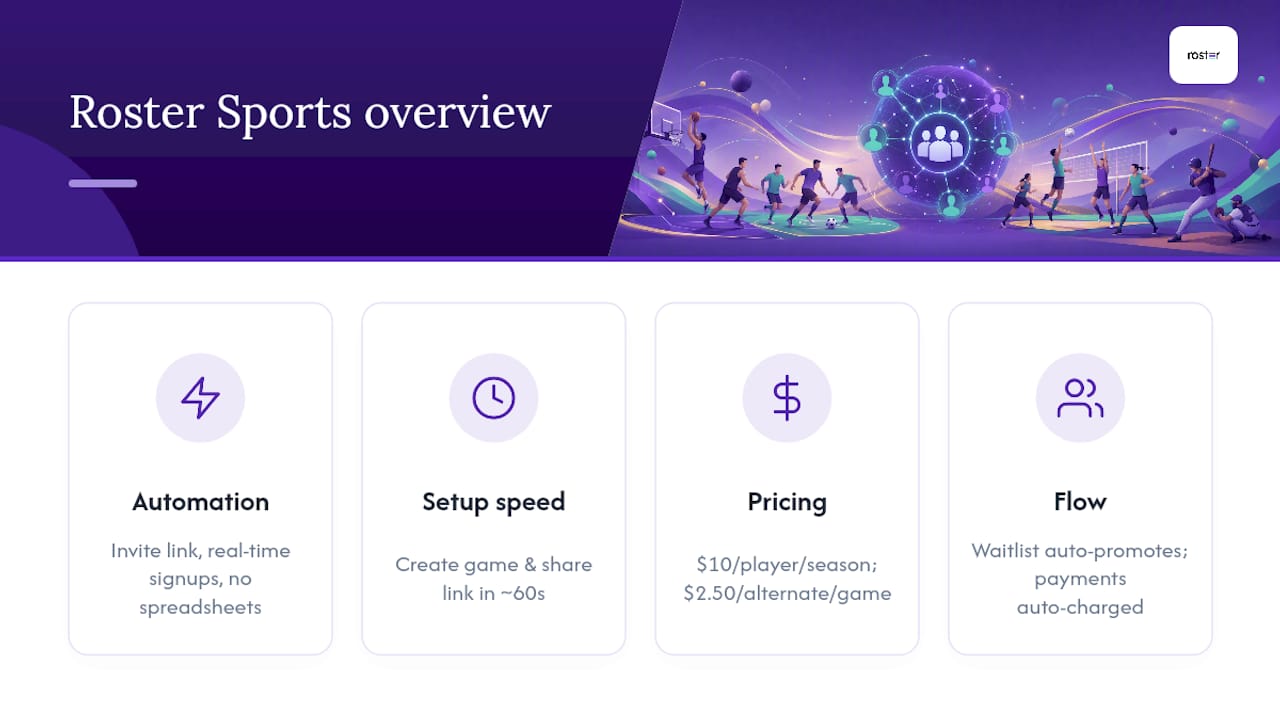
Roster Sports automates the entire invite cycle: send one link, watch signups fill in real time, let the waitlist promote itself when someone drops, and track who's paid without a single spreadsheet. In about 60 seconds you can create a game, set your roster capacity, and share the link with your regulars or a new group chat.
Billing is straightforward: a manager pays $10 per rostered player per season and $2.50 per alternate per game, charged automatically once the game has been played. No manual invoicing, no awkward Venmo requests to chase down yourself. If you're ready to stop retyping the same reminder every Tuesday night, start your first game on Roster Sports and see what your fill rate looks like after two weeks.
Sources
The timing, wording, and operational guidance in this piece draws on practical organizer resources: TapNGame's step-by-step guide to organizing pickup games covers closed-invite structure and confirmation deadlines, LeagueArc's communication strategy guide documents the open-rate gains from shorter messages, and Who's In's breakdown of automating weekly games covers waitlist mechanics and reduced admin time in more depth.
- League Communication Strategies for Administrators (2026) | leaguearc
- Basketball, Volleyball & Soccer: Organize Weekly Games Without WhatsApp Chaos | Who's In