

Track guest invites by running every RSVP through one persistent signup link instead of scattered texts. Set explicit regular and alternate slots, turn on automated waitlist promotion so open spots fill themselves, and send scheduled reminders while logging payments against the same roster. That combination is what actually stops the group-chat chaos.
TL;DR:
- Using a single event link with detailed fields for time, location, capacity, price, and skill level reduces confusion and scattered RSVPs.
- Automated waitlist promotion prioritizes regular, reliable, and skilled participants, coordinate responses within a 15- to 30-minute check-in window.
- Sending scheduled reminders and collecting payments in advance significantly minimizes no-shows and off-schedule cancellations.
- Roster Sports automates the entire workflow, replacing manual texts and spreadsheets with one recurring link that manages signups, waitlisting, and payments efficiently.
- Focusing on simple, consistent processes like one link, explicit slots, and scheduled reminders can eliminate 90 percent of organizing chaos.
Table of Contents
- Guest Invite Tracking Starts With One Link, Not a Chat Thread
- Manage Roster, Alternates, and the Real-Time Waitlist
- Reduce No-Shows and Handle Payments in the Invite Workflow
- Reusable Invite and Message Templates Plus Simple Workflows
- How Roster Automates This Whole Workflow
- A Note on What Actually Moves the Needle
- Try Roster Sports for Your Next Game
- Sources
Guest Invite Tracking Starts With One Link, Not a Chat Thread
Most pickup organizers lose track of RSVPs because the invite lives in three places at once: a group text, a calendar hold, and someone's memory. Fix that by pinning a single event link everywhere players look, your group chat, your bio, or a pinned message, so there's exactly one place to say yes.
A signup page that actually works needs a handful of fields, no more. SignUpReady's coordination guidance recommends keeping capacity, timing, and notes visible in one shared spot rather than buried in replies, and that principle holds for weekly pickup games just as much as it does for club sign-ups.
Here's what belongs on that single event link:
- Date and time, including check-in window if you run a tight schedule
- Location, with the exact court, field, or gym entrance if the venue has more than one
- Capacity, split by role, regulars filling core roster spots, alternates on standby
- Price, so nobody's surprised when payment comes up
- Skill-level tag, especially for pickup basketball or volleyball where mismatched games fall apart fast
Roster size depends on format. A 5v5 basketball run usually needs around ten regulars plus a few alternates to absorb late cancellations. A 7v7 soccer game runs tighter, with somewhat more regulars, because substitutions happen mid game rather than between them. Volleyball games with rotating six-person sides often carry the deepest alternate pool, since one no-show breaks the rotation entirely.
Lock the roster on a fixed deadline, two hours before kickoff works for most weeknight games, and stop accepting new regulars once that window closes. Anyone who signs up after the lock goes straight to the alternate list. That one rule alone kills most of the last-minute scrambling organizers deal with.
Manage Roster, Alternates, and the Real-Time Waitlist
When a regular drops, the fix should not require you to text six people and hope one replies first. Automated waitlist promotion moves the next eligible alternate into the open spot the moment a cancellation happens, and that single change removes the manual chasing that eats up an organizer's Sunday afternoon.
Whether you require a confirmation step depends on your group. Casual weekly runs can auto-confirm promoted alternates immediately. Paid or competitive games should require a quick reply before the spot locks, since money and reliability both matter more once cash is involved.
Run promotions in this order:
- Regulars first. Anyone with standing status jumps the alternate queue if they were bumped for a scheduling conflict.
- Reliability history next. Alternates who've shown up on short notice before get priority over first-timers.
- Skill level last. Only break ties by position or skill fit if the first two rules leave multiple equally qualified players.
Track just three fields per player: attendance count, last-minute cancellation count, and response time to promotions. That's enough data to settle almost any dispute about who deserved the spot.
Set a check-in window of 15 to 30 minutes before the game. If a promoted alternate doesn't confirm inside that window, move to the next name automatically rather than waiting and hoping.
Pro Tip: Keep a rolling three-month log of no-shows and late cancellations per player. When someone argues they "always" get bumped unfairly, you'll have the receipts instead of a guess.
Reduce No-Shows and Handle Payments in the Invite Workflow
No-shows cost organizers real money when they've already fronted court time or league fees. The fix isn't a longer policy, it's better timing on reminders and payment collection tied to the same signup you already track.
Send reminders on a fixed cadence: 24 hours out, then again 2 hours before kickoff, and a short check-in text right at game time for anyone who hasn't replied. Roster's research on no-show patterns found that small, visible nudges, explicit deadlines and clear confirmation windows, cut flaking more reliably than detailed policy write-ups nobody reads anyway.
For payments, decide upfront whether you collect at RSVP or on-site, and stick with one method consistently:
- Collect at signup for paid leagues or recurring games where flaking costs you a forfeit fee
- Collect on-site for casual runs where trust is high and turnover is low
- Reconcile Venmo or Zelle payments against your roster the same day, matching payer names to signup names before the next session, not weeks later
Consider a soft enforcement policy for repeat offenders: a small reserve fee for late cancellations, or loss of regular status after two unexcused no-shows in a season. State the rule once, in the invite template itself, so nobody can claim they didn't know.
Adult recreational sports draw tens of millions of weekly participants across the country, which means the coordination burden on organizers scales with a market most people underestimate.
After every game, run a quick reconciliation: confirm who played, who paid, who no-showed, and update your reliability log before you forget the details.
Reusable Invite and Message Templates Plus Simple Workflows
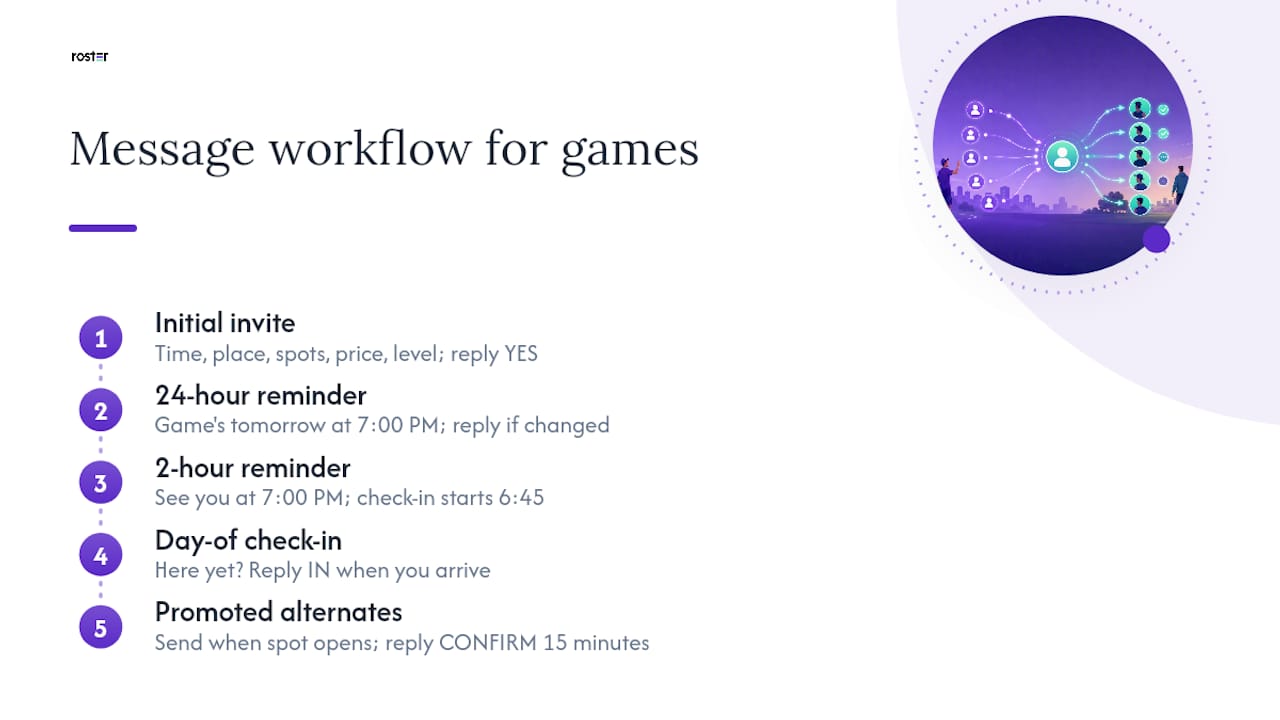
Copy-paste templates beat writing a fresh message every week. Roster's guidance on invite message elements breaks down exactly which fields fill rosters fastest, and the short version is: include everything, guess nothing.
Initial invite: "Pickup basketball, Thursday 7:00 PM at Central Gym. 10 spots, $8 each, intermediate level. Reply YES to claim a spot, first come first served."
24-hour reminder: "Game's tomorrow at 7:00 PM, Central Gym. Reply if plans changed so I can fill your spot."
2-hour reminder: "See you at 7:00 PM. Check-in starts 6:45."
Day-of check-in: "Here yet? Reply IN when you arrive."
For promoted alternates, send one message the moment a spot opens: "You're in for tonight's game, spot opened up. Reply CONFIRM within 15 minutes or it goes to the next person." Save every template in your notes app and reuse them for recurring games, only the date and headcount need to change week to week.
How Roster Automates This Whole Workflow
Every step above, the single link, the slot types, the waitlist promotion, the payment tracking, is exactly what Roster Sports was built to automate instead of leaving it to manual texts.
- One event link replaces the pinned message and the repeated "here's the info again" text
- Capacity and alternate slots get set once and enforced automatically
- Waitlist promotion happens in real time when someone drops, no group chat required
- Payment references tie to peer-to-peer Venmo transfers between players and managers, so reconciliation isn't a separate spreadsheet
| Manual workflow | Roster automated workflow |
|---|---|
| Text roster updates individually | One link updates everyone at once |
| Track cancellations by memory | Auto waitlist promotes next alternate |
| Chase payments after the fact | Payment tracking tied to roster status |
| Rewrite invite each week | Recurring event reuses saved details |
The time savings show up most on recurring weekly games and last-minute dropouts, the two situations that eat the most organizer attention for the least payoff. Read Daniel's breakdown of invite message elements or the full guide to reducing no-shows before piloting the workflow on a single upcoming game.
A Note on What Actually Moves the Needle
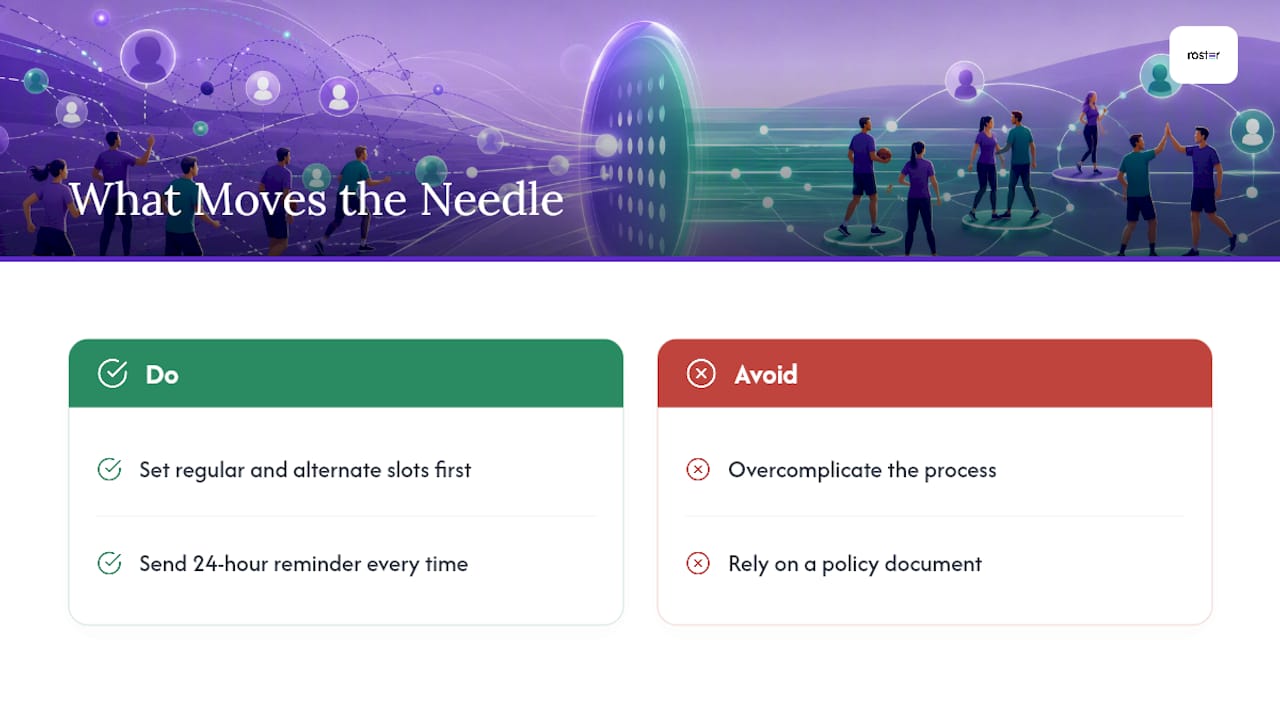
Most organizers overcomplicate this. The fix isn't a better policy document, it's fewer places for information to hide. One link, explicit slots, and a reminder sent on schedule solve 90 percent of the roster chaos I see organizers describe.
Adopt two habits this week: set your regular and alternate slots before you post the invite, and send that 24-hour reminder without exception. Everything else, waitlists, payments, disputes, gets easier once those two things are consistent.
— Daniel
Try Roster Sports for Your Next Game
The app replaces the group chat and spreadsheet with one link that handles signups, alternates, and waitlist promotion automatically, so organizers can focus more on playing instead of texting multiple people about a dropped spot. It fits weekly pickup runs, paid rec leagues, and anyone tired of manually chasing Venmo payments after the fact.

If you run games out of a shared gym or studio space, a facility partner like VO2WOD can round out the logistics side, but the roster and payment tracking itself is where Roster Sports does the heavy lifting. Set up your next game on Roster Sports and send one invite link instead of six texts.
Sources
- Tapping into a Neglected $36 Billion Industry: Why Flickmatch's Founder Believes AI Is the Future of Sports Technology - LA Weekly
- Spring Sports signup season: a guide to team coordination | SignUpReady