

The most reliable multi-team scheduling method is a recurring event link that locks a capacity number, opens a waitlist with payment authorization built in, and auto-promotes alternates the moment a spot opens. That single setup replaces the RSVP spreadsheet, the group chat chaos, and the manual "who's in" texting. Run it right and you cut no-shows, kill hours of weekly admin, and give every player a self-serve way to confirm, cancel, or grab an open slot the instant it appears.
TL;DR:
- Setting the waitlist threshold below the ideal roster size allows for timely expansion before player frustration occurs.
- Using FIFO automatic promotion and requiring immediate payment authorization at signup ensures quick roster filling and reduces no-shows.
- Consistent weekly scheduling at the same time and location significantly improves attendance over rotating time slots.
- Tracking no-show rates, waitlist depth, and time-to-fill over seasons provides clear signals for adjusting capacity and format.
- Automating schedule notifications and calendar syncing minimizes admin work and prevents players from missing or forgetting scheduled games.
Table of Contents
- What Should Be on Your Multi-Team Scheduling Checklist?
- How Do You Set Up Recurring Games Across Multiple Teams?
- How Do You Manage Rosters and Waitlist Promotions?
- What Payment Rules and Confirmation Messages Actually Work?
- What Scheduling Habits Actually Reduce No-Shows?
- How Do You Handle Overlapping Schedules Between Teams?
- How Should Scheduling Tools Connect to Calendars and Notifications?
- How Do You Track Availability Across Multiple Teams?
- What Should You Measure to Improve Scheduling Next Season?
- What Roster's Approach to Multi-Team Scheduling Gets Right
- Ready to Automate Your Multi-Team Scheduling?
- Sources
What Should Be on Your Multi-Team Scheduling Checklist?
Before you send a signup link to four teams or forty players, lock these details down. Skipping any one of them is how you end up fielding "wait, am I on the team?" texts at 9 p.m. the night before a game.
- Cap and quorum: set the max roster size per team and the minimum number needed to avoid canceling (soccer needs different numbers than pickup basketball).
- Fixed day and time: pick one recurring slot per division and don't move it week to week.
- Waitlist rules: turn it on, and decide upfront whether promotion is automatic (first in, first out) or manually reviewed.
- Payment model: choose deposit versus full payment per event, and set your refund window in writing.
- Payment authorization on the waitlist: require it at signup, not after a spot opens.
- Confirmation and reminder automation: draft what each message says (assignment, welcome, game-day reminder) before the season starts.
Pro Tip: Set your quorum threshold below your ideal roster size, not equal to it. A soccer game that needs 14 to be fun still works fine at 11 with subs rotating, but a game that requires exactly 14 will get canceled the first time three people bail on a Tuesday.
How Do You Set Up Recurring Games Across Multiple Teams?
Building a schedule that survives contact with real life takes five steps, done in order.
- Create a separate group for each sport or division. Each one gets its own defaults for roster cap, cost, and cadence, so a Tuesday soccer group never inherits Thursday volleyball's settings by accident.
- Lock your venue times before you publicize anything. Nothing burns trust faster than confirming forty players for a field you don't actually have booked.
- Pick one day and time per division and stick to it. Rotating time slots measurably hurts attendance, while a fixed weekly slot is the single biggest lever you have for keeping people showing up. If you want variety, rotate which team plays first, not which night the league meets.
- Publish the full recurring series, not single one-off events. Players who can see the next six Tuesdays on the calendar plan around them; players who get a fresh link every week forget you exist by week three.
- Watch your waitlist depth as an expansion signal. Once a division's waitlist consistently runs 15 to 20% of team capacity, that's your cue to open a new team or division next season, rather than let people churn out.
Low-friction signup matters more than most organizers assume, an approach well discussed in the Fitness Flow blog. Letting players claim an open slot without forcing an account creation removes the single biggest drop-off point between "saw the link" and "confirmed a spot." Every extra form field or login screen is a chance for someone to close the tab and forget.
How Do You Manage Rosters and Waitlist Promotions?
Start by deciding whether a signup counts as a Free Agent (an individual filling any open spot) or a Team Player (locked to one roster). That single distinction changes how your waitlist behaves: free agents can slide into whichever team needs a body, while team players only free up a spot within their own roster.
From there, the mechanics matter more than the policy:
- Use FIFO auto-promotion so the person who's been waiting longest gets the next open spot, automatically, with no organizer intervention.
- Notify promoted players the instant they move up, and require a quick confirmation or payment step so the spot doesn't sit in limbo.
- If you ever promote someone manually, log the timestamp and payment authorization status. Skipping this is exactly how leagues end up double-charging a player or double-booking a spot.
- Keep a short activation window, generally 24 to 48 hours, for a promoted waitlister to confirm before you move to the next name.
- Export rosters as CSV or PDF each week so coaches and field officials have a clean, current list without asking you for one.
Waitlist depth is a demand signal, not just a queue. One league saw its waitlist climb to 30% of capacity, expanded to a new division, and filled it almost immediately — turning a bottleneck into new revenue instead of a source of complaints.
Track that number season over season. It tells you exactly where to add capacity before players get frustrated and stop signing up altogether.
What Payment Rules and Confirmation Messages Actually Work?
Full payment or a card-on-file authorization at signup works better than a deposit-plus-balance system for single-game or drop-in RSVPs. Deposits create a second collection step you have to chase down manually, and chasing payments is exactly the admin work you're trying to eliminate. For season-long commitments, a smaller upfront deposit tied to an authorized card can make sense, but for weekly pickup games, collect it all upfront.
The waitlist is where payment authorization earns its keep. Capturing full registration and payment details at the moment someone joins the waitlist means a spot can activate instantly when it opens, no re-registration, no back-and-forth. That's the difference between a waitlisted player showing up next Tuesday and one who missed the window because nobody answered a text in time.
Four messages cover nearly everything a player needs to hear from you:
- Instant receipt the moment they sign up or pay.
- Team assignment confirming which roster or session they landed on.
- One-week welcome with venue details, parking notes, and what to bring.
- 48-hour game reminder as the actual nudge that prevents no-shows.
That sequence resolves the majority of pre-season support questions before a player even thinks to ask them.
Pro Tip: Set a hard decision date for waitlist activations, at least 48 hours before the season's first game, after which you stop trying to fill remaining spots and lock the roster. Chasing stragglers past that point costs more time than it's worth.
What Scheduling Habits Actually Reduce No-Shows?
Consistency beats cleverness. A league that meets at the same field, same day, same time every week will outperform one that rotates "for variety," full stop. One case study found attendance dropped 25% when a league moved its schedule around week to week, which is a brutal price to pay for a scheduling experiment nobody asked for.
A few other habits show up again and again in leagues that retain players season after season:
- Run 6 to 8 regular-season games plus a short playoff round. Shorter commitments perform better with adults who are already juggling work and family schedules.
- Weeknight evenings (roughly 6:30 to 9 p.m.) and Saturday mornings tend to draw the strongest adult turnout; avoid Sunday nights and holiday weekends when you can.
- Build in social anchors, a sponsor bar for post-game drinks, a kickoff mixer, a midseason social, a championship night. These turn a rec league into a group people show up for even on a bad-weather Tuesday.
- Track your no-show rate and waitlist depth every season and adjust capacity, timing, or format based on what the numbers actually say, not what you assume.
None of this requires guesswork once you're tracking the right two numbers. No-show rate tells you if your reminder cadence and quorum threshold are working. Waitlist depth tells you if it's time to grow.
How Do You Handle Overlapping Schedules Between Teams?
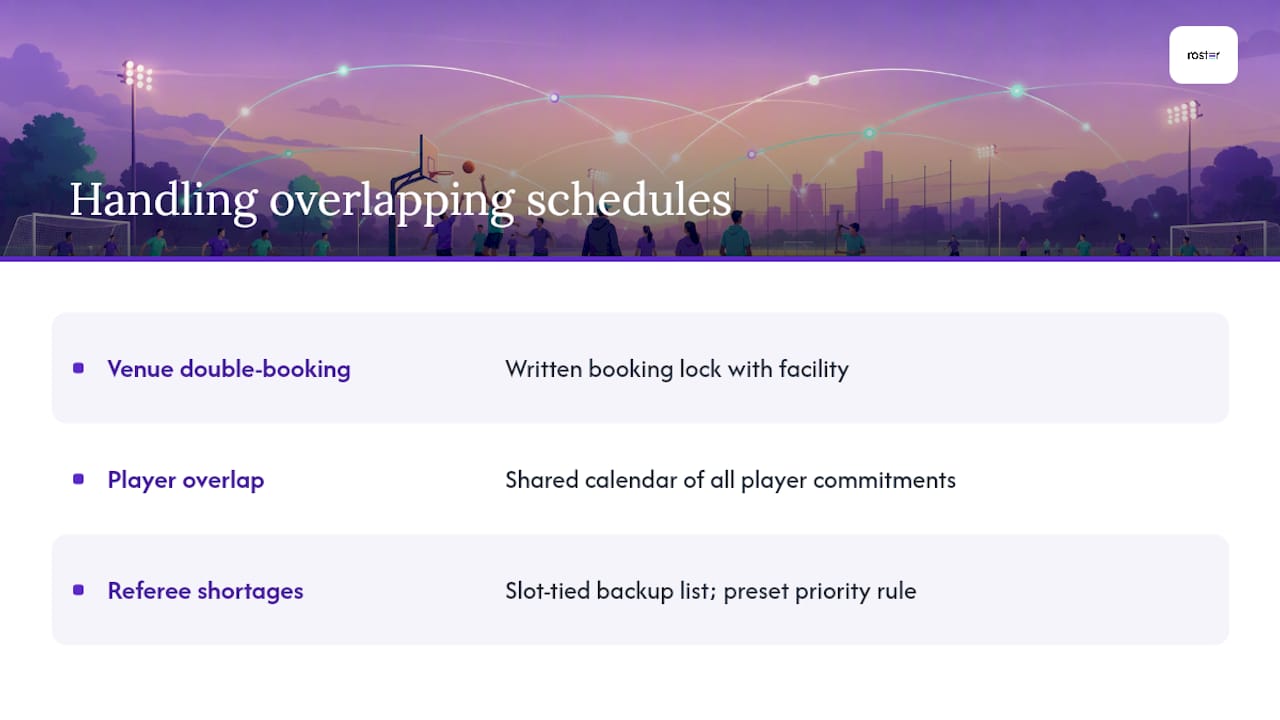
Conflicts show up in three flavors: venue double-bookings, player overlap (someone signed up for two teams that play the same slot), and referee or official shortages. Venue conflicts get solved at the booking stage, before you publish anything, by locking your field or gym time in writing with the facility, not a verbal "should be fine."
Player overlap is trickier because it's invisible until someone flags it. The fix isn't more spreadsheets, it's a shared source of truth: one calendar view where a player's commitments across every team or division they've joined show up in one place, so a double-booking gets caught before the RSVP goes through instead of after.
Official and referee shortages are best handled with a buffer, not a scramble. Keep a short list of backup officials tied to specific time slots rather than specific games, so a Tuesday shortage doesn't require reworking the whole week. When two divisions genuinely need the same slot, resolve it with a simple priority rule set in advance (longest-tenured division gets first pick of time, or divisions alternate priority by season) rather than negotiating it fresh every time it comes up. Deciding the rule once, before the conflict happens, is what actually prevents the argument.
How Should Scheduling Tools Connect to Calendars and Notifications?
A schedule that only lives inside one app is a schedule half your players will miss. The fix is straightforward: every recurring event should push directly into each player's personal calendar (Google Calendar, Apple Calendar, whatever they already check) rather than requiring them to log into a separate portal to check the time.
Notifications matter as much as the calendar sync itself. A reminder sent 48 hours out catches people while they can still adjust their week; a reminder sent the morning of catches almost nobody who's already committed elsewhere. Layering both, an early heads-up and a same-day nudge, covers the two different failure modes: forgetting entirely, and forgetting to leave on time.
The organizers who cut admin time the most are usually the ones who moved away from managing this inside a group chat. Shifting from chat-based coordination to a dedicated event tool drops weekly admin from hours down to minutes, mostly because the tool handles the reminder and calendar sync work that used to require someone manually typing "reminder: game tomorrow at 7" into a group thread every single week.
How Do You Track Availability Across Multiple Teams?
Once you're running more than one team, availability tracking stops being a courtesy and becomes the thing that prevents your Thursday roster from quietly bleeding players into your Saturday roster. The cleanest approach is a single player profile that shows every team or session someone has joined, so you catch a scheduling conflict before it becomes a no-show.
Watch two signals per division: how many regulars have confirmed for the next session, and how deep the waitlist is behind them. A division running under quorum two weeks in a row is a signal to check in with lapsed players before you lose the night entirely. A division with a growing waitlist is the opposite problem, and the better one to have.
Availability tracking also solves a subtler issue: alternates who play for multiple teams. Someone signed up as a free agent might be eligible to fill a gap on Tuesday's team and Thursday's team in the same week. Without a shared view of who's committed where, you'll either double-book that person or miss using them entirely.
What Should You Measure to Improve Scheduling Next Season?
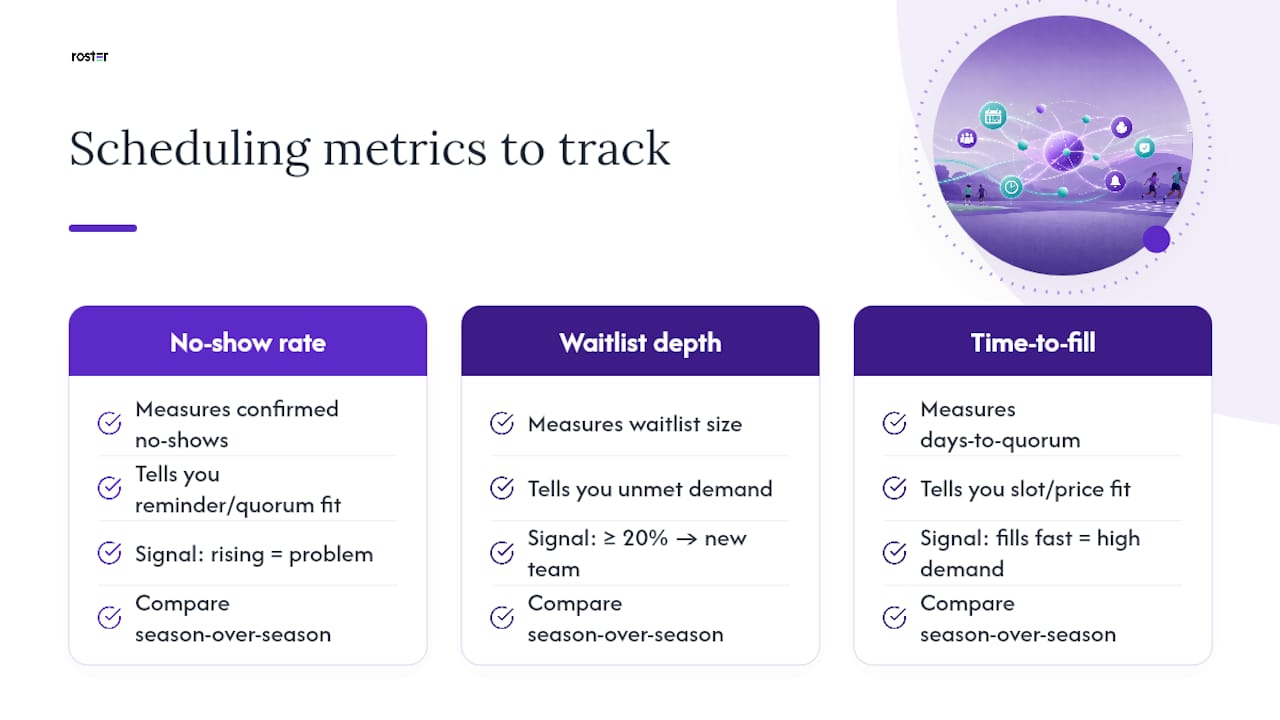
Two numbers matter more than the rest combined: no-show rate and waitlist depth, tracked per division, per season. No-show rate tells you if your confirmation cadence and quorum threshold are calibrated correctly. If it's climbing, the problem is usually a reminder that's poorly timed or a roster that's too easy to ignore because there's no real accountability attached to a "yes."
Waitlist depth is your growth indicator. A division consistently at 20% or more signals unmet demand worth turning into a new team next season.
A third figure worth watching, less discussed but genuinely useful, is time-to-fill: how long it takes a division to hit quorum after you open signups. A division that fills in two days versus one that limps to quorum the night before tells you something concrete about whether your time slot, price point, or division size is actually matched to demand. Compare these three numbers season over season, not week over week, since single-week swings are mostly noise from holidays and weather.
What Roster's Approach to Multi-Team Scheduling Gets Right
Roster's whole design treats roster management as something that should run itself, filling open spots automatically and stacking dropouts into a waitlist instead of a group text nobody reads in time. That matches everything above: the workflow works because the busywork disappears, not because organizers got better at busywork.
The bigger shift is behavioral. Organizers who move off group chats and onto a dedicated RSVP tool stop spending Tuesday nights manually counting "yes" replies buried under twenty unrelated messages. That time goes back into actually running the game.
If you want to test this before committing a full season to it, try three steps this week: set up one recurring event series, turn on the waitlist with payment authorization required at signup, and run it for two weeks while tracking your no-show rate against your last two weeks of manual scheduling. The comparison usually speaks for itself.
— Daniel
Ready to Automate Your Multi-Team Scheduling?
The app turns this workflow into something you set up once and stop thinking about, recurring events with capacity limits, waitlists with payment authorization already attached, and auto-promotion the second a spot opens. No more manually cross-checking who paid, who's waitlisted, and who quietly dropped out three days ago.

Instead of rebuilding your roster logic in a spreadsheet every season, set up your first recurring game series and let the waitlist and payment rules run themselves from week one. If you want to see the fee structure and billing details before you commit a full season to it, the pricing and terms page lays it out plainly.