

The fastest reliable workflow is: build a session template, reserve your recurring time slots, assign teams or players to each one, preview the generated occurrences, then publish. Two features do the heavy lifting after that: automatic signups that fill open spots without you texting anyone, and automatic waitlist promotion when a player drops. Roster is one app that runs this whole workflow, from template to published series.
TL;DR:
- Set the recurrence end date within four weeks to quickly identify and fix template mistakes before committing to longer series.
- Use venue-specific settings, such as operating hours and setup time, to prevent conflicts and build buffers at least 15 minutes between games at the same location.
- Automate signups, waitlists, and capacity limits through the app to reduce manual roster chasing and instantly fill openings when players drop out.
- Always preview generated occurrences carefully, checking for correct dates, venues, and absence of double bookings before publishing shifts the series into live status.
- Keep the recurrence templates as the single source of truth by avoiding manual edits to individual occurrences, since these can be overwritten by schedule regeneration.
Table of Contents
- What Is Recurring Game Scheduling, Exactly?
- How Do You Calculate the Right Number of Recurring Slots?
- Managing Venues Without Double-Booking Divisions
- Automating Signups, Capacity, and Waitlists
- Calendar Integration and Notification Settings
- Previewing and Publishing: Where Most Mistakes Happen
- What Roster Sports Has Learned From Real Organizers
- Best Practices for Communicating Schedule Changes
- Managing Time Zones in Recurring Game Scheduling
- Using Analytics to Optimize Scheduling Frequency
- Integrating With External Scheduling Tools and Platforms
- Strategies for Rescheduling Missed or Canceled Games
- Our Take: What Actually Moves the Needle
- Try Roster Sports for Your Recurring Game Series
- Where to Dig Deeper
- Sources
What Is Recurring Game Scheduling, Exactly?
Recurring game scheduling means setting up one game or event to repeat on a pattern (weekly pickup soccer, biweekly trivia night, a Tuesday/Thursday rec league) instead of creating each session from scratch. You define the rules once. The system generates every future occurrence, and you only step in when something breaks the pattern, like a holiday or a rained-out field.
That distinction matters because most organizer headaches come from treating recurring games like one-off events. You end up rebuilding the same signup sheet 40 times a season. A proper recurring setup front-loads the work into one template, then automates everything downstream: reminders, waitlists, and roster fills.
Step-by-step: build your recurring series
Here's the sequence that works whether you're running a five-a-side soccer league or a Tuesday night trivia crew:
- Create the session template. Name the game, set capacity (say, 10 players), write a short description, and add a price if you're collecting fees.
- Toggle "repeats" and pick a frequency. Weekly, biweekly, or monthly are the common options. Set your start date, end date (or leave it open), and confirm the time zone.
- Save the recurring time and apply offsets if needed. If two divisions share one field, offset the second group's start time by 30 or 60 minutes so games don't collide.
- Preview the generated occurrences. Check every date, time, and assigned court before anything goes live. Most platforms pre-create each occurrence while keeping RSVPs separate, so a mistake in the template shows up in every future game unless you catch it here.
- Publish. This is the moment your recurring series turns into actual booked matches, and it typically triggers calendar invites and confirmation emails to your roster.
Pro Tip: Run your first recurring series with a short end date, like four weeks, instead of open-ended. You'll catch template mistakes fast, and adjusting a four-week series is far less painful than fixing 26 weeks of bad data.
How Do You Calculate the Right Number of Recurring Slots?
Interval and offset are the two concepts that make or break a multi-division schedule. Interval is simply how often the game repeats: weekly, biweekly, or some custom gap. Offset is the stagger you apply so two groups sharing a resource don't land on the same slot, like scheduling Division B one week later than Division A on the same field.
The number of recurring time slots you need depends on how many competitors are in each division. League Systems documentation lays out a simple formula: for an even number of competitors, slots equal competitors divided by two. For an odd number, slots equal (competitors plus one) divided by two.
- Five competitors per division, 10 divisions: (5 + 1) / 2 = 3 slots per division, times 10 divisions = 30 recurring times total.
- Choose an end date when you're running a defined season or tournament bracket.
- Leave recurrence open-ended for standing weekly pickup games with no natural stopping point.
Managing Venues Without Double-Booking Divisions
Assign each division its own recurring time slot rather than a shared pool, so nobody has to fight over court access week to week. Venue metadata matters more than people assume: operating hours, surface type, and setup or teardown time all affect whether back-to-back games are realistic.
A scheduling system that checks courts, player availability, and existing bookings together can flag conflicts before they happen instead of after someone shows up to a taken field.
- Reserve fixed recurring slots per division so distribution stays even across the season.
- Cross-reference venue hours and setup time against your game length before locking a slot.
- If a conflict surfaces, use an offset, an alternate venue, or split the week across two days.
- Notify affected players as soon as you shift a slot. Don't wait until game week.
Pro Tip: Build a 15-minute buffer between back-to-back games at the same venue. Teams running late to clear the field cause more schedule slippage than almost any other single factor.
Automating Signups, Capacity, and Waitlists
Set your per-session cap first (10 players, 12 skaters, whatever fits your format), then decide whether RSVPs apply per-occurrence or across the whole series. Per-occurrence signups give players more flexibility to skip a week without dropping the whole series, and most organizer-focused apps handle capacity caps that close automatically once full.
- Set your capacity limit and choose RSVP scope (single game vs. full series).
- Turn on automatic waitlist promotion so a dropout instantly opens a spot for the next person in line, with a notification sent the moment it happens.
- Set your alternate threshold. If you typically lose two players to last-minute conflicts, keep two to three alternates queued per game.
- Link a payment option like Stripe or Venmo at signup if you're collecting fees, so money isn't chased down after the fact.
Manual roster chasing is the single biggest time sink organizer apps are built to remove, and automatic waitlist promotion is the feature that actually delivers on that.
Calendar Integration and Notification Settings
Export your recurring series in iCal format and it'll show up correctly as a repeating event in Google Calendar or Apple Calendar, updating automatically if you adjust the template later.
- Publishing a series typically sends automatic calendar invites to every rostered player.
- Set reminder cadence at 48 hours, 24 hours, and 2 hours out. Three touches catch people who ignore the first two.
- If you regenerate a schedule, follow a cancel-notify-then-republish pattern so players don't see conflicting invites in their calendar.
- Pairing a reminder sequence with payment collected at signup measurably cuts no-shows, since money on the line changes behavior more than a text does.
Previewing and Publishing: Where Most Mistakes Happen
Before you publish, check three things in the preview screen: correct dates, correct court or venue assignment, and no player double-booked across two divisions.
- Review the generated occurrence list line by line, not just the first week.
- Confirm that publishing (creating booked matches) is what triggers notifications and calendar invites to your roster.
- For exceptions like a holiday closure, choose "keep pattern" to resume on the same weekday next available slot, or "next available" to shift forward without skipping a week entirely.
- Know that regenerating a schedule overwrites existing bookings and may fire cancellation emails first, so test changes on one division before applying them league-wide.
What Roster Sports Has Learned From Real Organizers
Sharing one event link instead of a group chat cuts RSVP confusion dramatically. It centralizes signups in one place instead of scattering them across texts and comments. Automatic waitlist promotion and alternate slots keep rosters full without an organizer manually calling around. Small changes, outsized time savings.
Best Practices for Communicating Schedule Changes
Players tolerate schedule changes fine. What they don't tolerate is finding out about one after they've already driven to the field. The fix is almost entirely about timing and channel, not tone.
Send the change notification the moment you make it, not the night before the game. A canceled Tuesday game announced on Monday morning gives people time to adjust their week; the same announcement at 8 PM Monday just creates frustration and a scramble.
Use one primary channel and stick to it. If your roster expects updates through the app's notification system, don't suddenly switch to a group text for one urgent change. Fragmented communication is how half your roster shows up to a canceled game.
Be specific about what changed and what didn't. "Tuesday's game moved to Wednesday, same time, same field" gives players everything they need in one sentence. Vague messages like "schedule update, check the app" generate more questions than they answer, and you'll spend the next hour fielding replies.
For recurring series specifically, flag whether the change is a one-time exception or a permanent shift to the pattern. Players need to know if next week reverts to normal or if the whole series moved. This is where the "keep pattern" versus "next available" distinction from your exceptions settings actually matters to communicate, not just configure.
Finally, confirm receipt when the stakes are high. A tournament final or a game with a rented venue deposit on the line deserves a read-confirmation or at least a request for a thumbs-up reply, not just a broadcast into the void.
Managing Time Zones in Recurring Game Scheduling
Time zone mismatches are the quiet killer of recurring schedules, especially for gaming leagues or remote teams that span regions. A weekly match set for "8 PM" means nothing on its own. It needs an anchor time zone locked into the template, not left to each player's assumption.
Set the time zone once at the template level, and make sure your platform converts that time correctly for each player's local display rather than showing a flat timestamp. This matters most twice a year: when Daylight Saving Time shifts in the US but not in every region a remote gaming team spans, a recurring 8 PM slot can quietly become 7 PM or 9 PM for players outside that time zone.
For leagues with a mixed local and remote roster, consider anchoring to a fixed reference like UTC internally and letting the display layer handle local conversion. That avoids the manual math error that creeps in when someone tries to adjust for DST by hand every March and November.
If your group is entirely local, this is a smaller problem. But confirm it explicitly anyway. Confirm the time zone setting when you first build the template, not after the first person shows up an hour early.
Using Analytics to Optimize Scheduling Frequency
Attendance data tells you things your gut feeling gets wrong.
Track fill rate per occurrence over a full season, not just a few weeks. Early-season numbers get skewed by novelty and bad weather. A six to eight week window gives you a real signal on whether a time slot works.
Watch for a pattern of late cancellations clustered around a specific day or time. If Wednesday games consistently see drop-offs 24 hours out, that's not bad luck. It's a scheduling mismatch with your players' actual weekly availability, and no amount of reminder emails fixes a slot that conflicts with a common work shift or school pickup time.
Waitlist depth is an underused signal. A consistently deep waitlist on one recurring slot is a direct argument for adding a second session at that same time, rather than assuming your current capacity is the ceiling. Conversely, a slot that never fills and never has a waitlist is a candidate to cut or move, freeing up the venue for something that actually has demand.
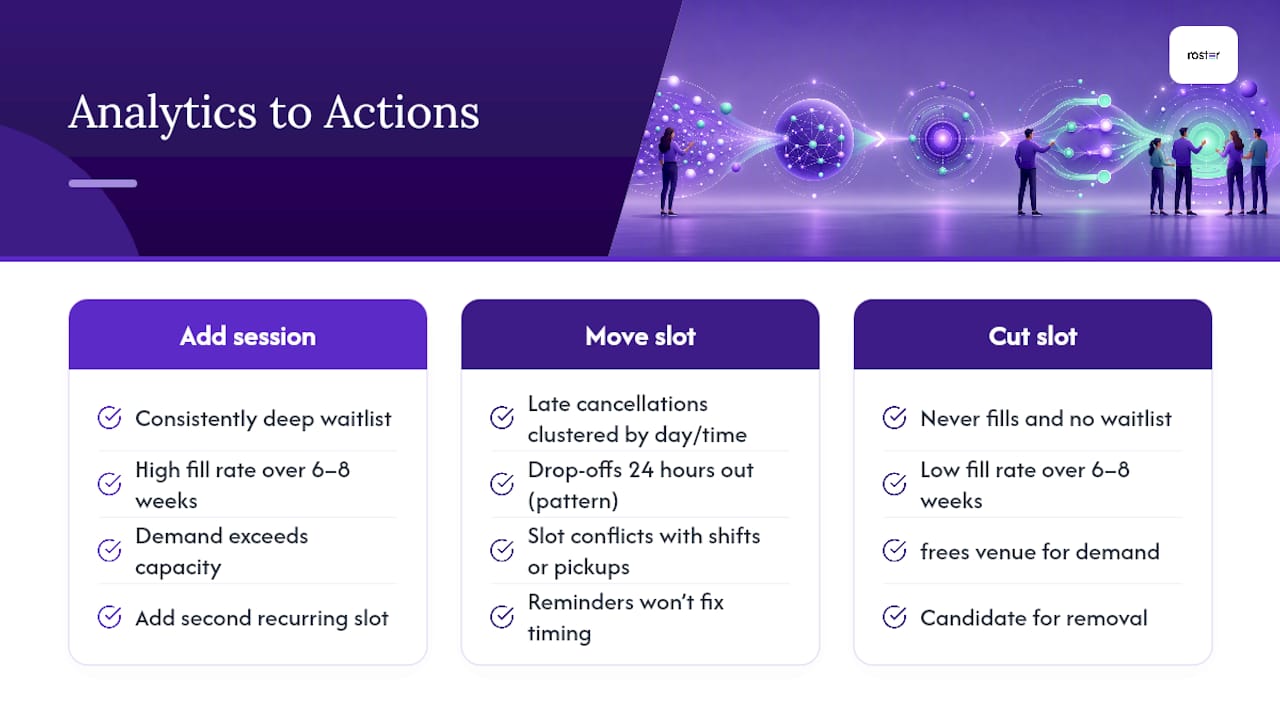
Review this data at natural break points, like season boundaries, rather than making frequency changes mid-series. Players adapt to a rhythm, and reshuffling the recurring pattern too often undoes the exact consistency that recurring scheduling is supposed to deliver.
Integrating With External Scheduling Tools and Platforms
Most organizers don't run in a vacuum. You've got a venue's own booking system, a personal Google Calendar, and maybe a league association's platform all needing to stay in sync with your recurring game series.
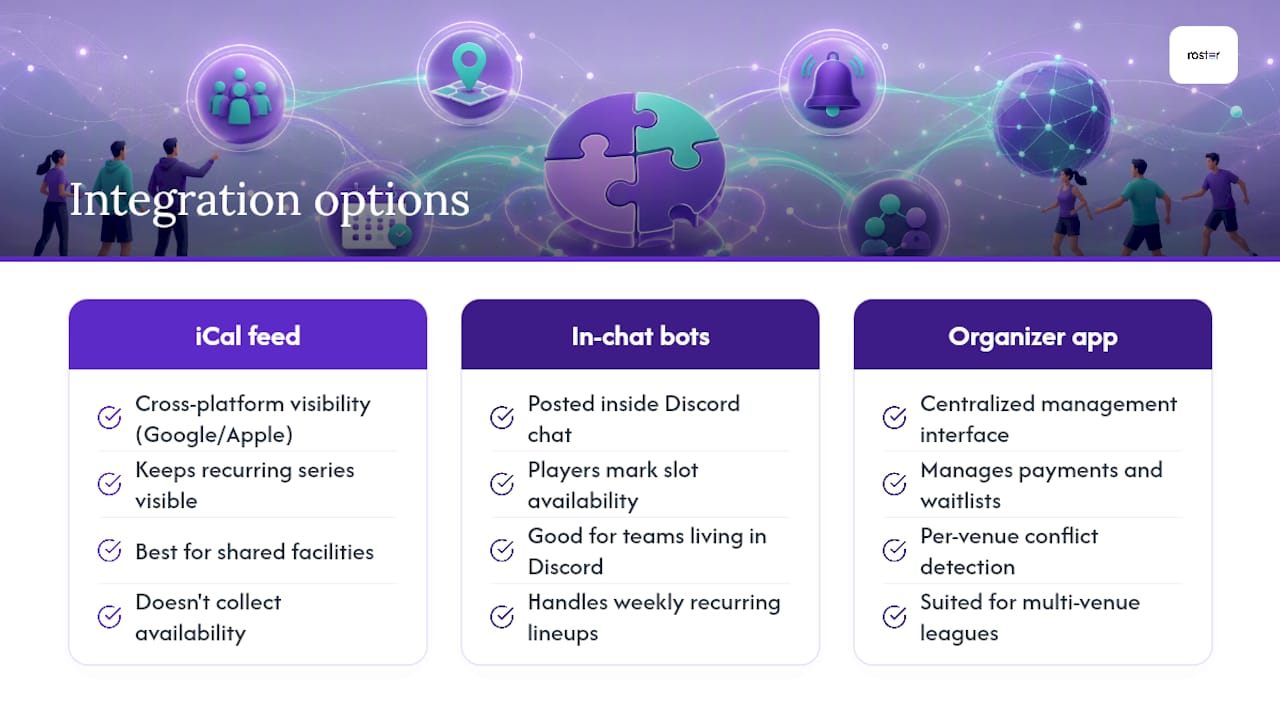
The cleanest integration point is calendar export. An iCal feed keeps your recurring series visible across Google Calendar, Apple Calendar, and most venue management tools without manual re-entry every week. This matters most when a shared facility, like a rec center or a multi-sport complex, needs visibility into your bookings to avoid scheduling something else in your slot.
For gaming teams specifically, chat-native tools have carved out their own lane. Bots like Supatimer post a weekly availability calendar directly inside Discord, letting players mark availability per time slot and role without ever leaving the chat. That's a real fit for teams that live in Discord and don't want to bounce between a chat app and a separate scheduling platform.
The tradeoff is scope. In-chat tools handle recurring weekly lineups well but usually don't manage payments, waitlists across multiple divisions, or venue-level conflict detection the way a dedicated organizer app does. Pick based on what you're actually coordinating. A single gaming squad needs less infrastructure than a 10-division rec league running across three venues.
Whatever you integrate, keep one system as the source of truth for the recurring pattern itself. Syncing calendars is fine. Having two separate places where someone can edit the actual recurrence rule is how schedules quietly drift out of sync.
Strategies for Rescheduling Missed or Canceled Games
A canceled game inside a recurring series has two honest options: skip it and resume the pattern next week, or find a makeup slot. Neither is automatically wrong, but conflating them creates chaos.
If you skip, communicate it as a skip immediately, and confirm the next occurrence is unaffected. Players need to know the recurring pattern itself is intact and this was a one-off exception, not a signal that the whole series is shifting.
If you're finding a makeup slot, treat it as a new one-time event linked to the series rather than trying to bend the recurring template around it. Bending the template to accommodate a single makeup date is exactly the kind of edit that causes a regenerated schedule to overwrite other bookings you didn't intend to touch.
For weather-dependent outdoor games, build a standing makeup policy before the season starts rather than deciding case by case. "Rain cancels, we add the game to the end of the season" is a rule players can plan around. A different decision every time a cancellation happens trains your roster to stop trusting the schedule.
Track your cancellation reasons over a season. If a particular slot cancels disproportionately (a field that floods, a gym double-booked by the venue), that's a scheduling problem to fix at the template level, not a rescheduling problem to keep patching around week after week. Roster's own guide to canceling a pickup game without losing your roster walks through keeping players engaged through a cancellation instead of losing momentum.
Our Take: What Actually Moves the Needle
Most advice on recurring scheduling focuses on the feature list: repeat toggles, calendar sync, notification settings. Useful, but secondary. The real lever is treating the template as the single source of truth and refusing to hand-edit individual occurrences once a pattern exists.
Where conventional advice falls short is the assumption that more manual oversight equals better outcomes. It's the opposite. Every manual override you make to a recurring series (a hand-adjusted time here, a special exception there) is a small crack in the pattern that eventually causes a regenerated schedule to overwrite something you meant to keep. The organizers who run the smoothest seasons are the ones who resist tinkering and instead push changes back into the template itself.
Prioritize three things in this order: get the template and recurrence math right before you publish anything, turn on automatic waitlist promotion before you worry about reminder cadence, and only start adjusting frequency once you have real attendance data, not a gut feeling from week two. Skipping straight to notification tweaks while your underlying template is shaky just automates the wrong thing faster.
— Daniel
Try Roster Sports for Your Recurring Game Series
Roster Sports runs the entire workflow this article walks through: build a template once, let players RSVP automatically, watch waitlists promote themselves when someone drops, and get notification cadence handled without a single manual reminder text. It's the difference between spending Sunday night chasing headcounts and spending it watching the game.

If you're currently running a recurring series through a spreadsheet and a group chat, the jump to an automated roster is smaller than it looks. Set up your first template, share one link with your players, and let the app handle signups and waitlist fills from there. Check out the Roster Sports app to get your first recurring series live this week.
Where to Dig Deeper
For the exact recurrence formulas and the preview-to-publish flow, see the League Systems schedule generation docs. For calendar export behavior and per-occurrence RSVP handling, check PlayRez's event features. For general recurring-group automation patterns, Brunchie's guide is a solid reference, and Fitness Flow's blog covers recurring class scheduling from a fitness-studio angle.
Sources
- Generate schedule — League Systems docs
- Club event management: recurring events — PlayRez features
- Recurring sports group guide — Brunchie