
Team chat overload happens when game logistics (who's in, who's out, who's bringing the ball) get buried in a flood of messages. The fix is to take logistics out of the chat. Put the game details, sign-ups and open spots in one place that everyone can check, and leave the chat for what chats are good at: banter, rides and post-game plans. This guide shows how to do that for an adult pickup group, step by step.
TL;DR
- Chat overload in a sports group comes mostly from using one thread for everything: scheduling, RSVPs, payments, jokes and last-minute dropouts.
- Research links communication overload to messaging fatigue and stress, and fatigue to a higher intention to quit using the messaging tool. For an organizer, that means players who go quiet.
- Move RSVPs, roster spots and waitlists into a single shared link, and keep the chat for conversation.
- Set a few plain chat rules, keep the group small enough to feel personal, and check a few simple numbers each season to see if it's working.
- Roster is built for this: one link for sign-up, real-time roster filling and an automatic waitlist.
Table of Contents
- What chat overload looks like in an adult sports group
- Why it happens
- What it costs you
- Step 1: Take logistics out of the chat
- Step 2: Use one link for sign-ups
- Step 3: Write three chat rules and pin them
- Step 4: Keep groups small and purposeful
- Step 5: Build habits that cut texts
- Step 6: Check whether it's working
- Our perspective
- How Roster helps
- FAQ
- Sources
What chat overload looks like in an adult sports group
You know the thread. The game is Thursday at 7. By Tuesday morning there are 43 unread messages. Three are answers to "who's in?", eleven are a debate about the field, and the rest are a meme war. Someone says "I'm probably in" at 9:40 p.m. Someone else says "can I bring a friend?" an hour later. By Wednesday night nobody can say how many players you have, and the organizer is scrolling back through the thread with a notepad.
This is a common experience, not a sign you run a sloppy group. A survey of people in the US and UK, cited by researcher Kate Mannell in The Conversation, found that 40% of respondents felt overwhelmed by group chat messages and notifications. In her own research, one participant missed 200 messages in a single group chat after leaving her phone at home. Another had a group chat that was active from 8 a.m. to 1 a.m.
In a pickup sports group the symptoms are specific:
- Nobody knows the headcount. Confirmations, maybes and retractions are scattered across dozens of messages.
- Important messages get buried. A field change or a start-time shift sits between two jokes.
- The organizer becomes a full-time secretary. One person keeps the real list, answers the same question five times and chases people who never replied.
- Players mute the chat. Then they miss the one message that mattered.
- Dropouts surface late. "Sorry, can't make it" arrives two hours before kickoff, in the same stream as everything else.
Why it happens
The chat was never designed to be a roster. It is a stream: new messages push old ones out of sight. A roster is a state: at any moment it has a clear number of people in, a number of open spots and a list of who is waiting. Trying to keep a state inside a stream is what produces the overload.
A few things make it worse in adult sports.
Everything shares one thread. Scheduling, payments, gear, banter and weather all land in the same place. Every message triggers a notification, so players can't tell the urgent from the casual.
Replies are conversational, not structured. "Maybe," "I think so," "depends on work" and a thumbs-up emoji are all answers. None of them is a count.
Groups grow. A pickup game that began with eight friends now has a pool of thirty, including regulars, occasional players and friends of friends. Larger groups mean more messages per game. Mannell's reporting notes that the group chats people enjoy most tend to be smaller groups with closer friends, which is the opposite of a growing sports pool.
The organizer is the only filter. Players can mute. Organizers can't, because they need to see everything in case a dropout or a question shows up.

What it costs you
Overload is more than an annoyance. A peer-reviewed study by Sun and Lee in Information Technology & People (2022) found that communication overload and social overload are positively associated with instant messaging fatigue and technostress. Higher levels of fatigue and technostress were in turn related to a stronger intention to stop using instant messaging.
Translate that to your group. If the chat is where your game lives, and the chat tires people out, some of them will drift away from the chat and then from the game. You rarely hear about it. A regular just stops replying, and one week you are two players short.
The cost lands on the organizer too. Time spent counting replies, reposting the details and finding substitutes is time not spent playing. Demand for adult sports is rising, which makes the problem bigger. The Sports & Fitness Industry Association's 2024 team sports report found that 25.7% of Americans aged 6 and older played a team sport in 2023, up from 23.4% in 2019. CivicScience data cited by the Christian Science Monitor shows the share of adults who play a team sport rising from 11% in 2020 to 18% in 2025. More players means bigger pools and more messages for whoever is organizing.

Step 1: Take logistics out of the chat
The single biggest improvement is to separate the two jobs your chat is doing.
Job one: logistics. Date, time, location, format, who's in, who's out, open spots, who's next on the waitlist, who has paid.
Job two: conversation. Trash talk, photos, ride shares, "great game last night."
Logistics need a single source of truth that doesn't scroll away. That can be a shared sheet, a pinned post or a dedicated app. Whatever you pick, it should meet four tests:
- Players can answer in one tap, with a clear yes or no.
- Everyone can see the current headcount without asking.
- When someone drops, the next person is notified without the organizer lifting a finger.
- Game details live in one place, so a change gets made once.
If your current system fails any of these, you will keep getting overload no matter how disciplined people are. For a deeper look at why messaging tools alone fall short for this job, see our piece on email vs. chat for pickup organizers.
Step 2: Use one link for sign-ups
The cleanest pattern for a pickup game is a single link. You set the game details once, post the link, and players respond there. The chat just carries the link.
This changes the organizer's week. Instead of asking "who's in?" and reading replies, you look at the roster. Instead of messaging eight people to fill a spot, the spot fills from a waitlist. Instead of announcing a field change in three places, you update the game.
A good first post for a new game is short:
Thursday 7 p.m., full-field 8v8. Sign up here: [link]. Spots fill in order. If you drop, release your spot in the link so the next person gets it.
Then stop answering RSVPs in the chat. If someone replies "I'm in" in the thread, reply once with "Tap the link to lock it in," and they'll learn quickly. Our guide to reducing no-shows in pickup games covers how clear sign-up and drop rules also protect game day attendance.
Step 3: Write three chat rules and pin them
Rules don't need to be strict. They need to be visible. Pin a short message at the top of the chat:
- Sign-ups happen in the link, not here. The chat is for conversation.
- Drop out in the link. Don't announce it in the chat, so the waitlist can move.
- Urgent changes (weather, field closed, start time moved) get one message that starts with the word "UPDATE."
The last rule is the most useful. When every real change starts with the same word, players can mute the chat without fear. They only need to search for "UPDATE" to catch up. It also gives you a way to keep important messages from being buried under a hundred replies.
If you coach or run a formal team, a written plan goes further. Our one-page communication checklist and templates give you ready-to-copy wording for the most common messages.
Step 4: Keep groups small and purposeful
Muting is the usual coping strategy, but Mannell points out that it comes with a trade-off: people may miss important information or have to dip in and out to check for relevant conversations. If everyone has to mute your chat to survive it, the chat is doing its job badly.
The better move is to design groups so muting isn't needed.
- One chat per game or season, not one forever. Old threads full of past games are noise for new players.
- Separate regulars from alternates. Regulars need season-long updates. Alternates need only the games where a spot opens. Giving them the same firehose helps nobody.
- Keep the social chat optional. Make it clear that the social chat is a place to hang out, not a requirement for playing.
- Cap the audience for urgent messages. Only people on that night's roster need to hear that the field is closed.
This is where structure beats willpower. An alternate shouldn't have to read forty messages to learn that a spot is open on Thursday.
Step 5: Build habits that cut texts
Tools help, but a few routines keep the volume down for good.
Announce on a schedule. Post new games on the same day each week. Players learn when to look, and you avoid a drip of reminders.
Send one reminder, not five. A single message the day before, with the link and the start time, beats a cascade of "don't forget!" posts. For ideas on timing and wording, see our organizer checklist for promoting pickup games.
Answer once, in public. If someone asks about parking, answer in a pinned note or the game details, not in a long thread. Next time, point to the note.
Handle payments outside the thread. Reminders about money are a major source of chat clutter. Track who has paid in one place instead of asking in the group.
Close the loop after each game. A quick "thanks, same time next week" with the link keeps momentum without extra back-and-forth.
Don't let the thread double as a planning meeting. If you are planning a season or a new league, do it in a short call or a document. Our walkthrough on starting an adult rec league in one season shows how to keep planning conversations organized.
Step 6: Check whether it's working
You don't need analytics software. Track a handful of simple numbers for a few weeks before and after you change your system.
| What to check | How to check it | A good sign |
|---|---|---|
| Messages per game | Count thread messages between announcement and kickoff | Falling over a few weeks |
| Time to a full roster | Note when the announcement went out and when the last spot filled | Getting shorter |
| Organizer time | Keep a rough tally of minutes spent on logistics | Dropping noticeably |
| Late dropouts | Count dropouts in the last 24 hours | Fewer, and replaced faster |
| Same-question repeats | Notice how often you answer "what time?" or "where?" | Rarely |
| Quiet regulars | Notice who stopped responding | Fewer people fading away |
Also ask two or three players directly: "Is the chat easier to live with than it was?" Their answer matters more than any count. If the volume falls but people still feel buried, your rules aren't visible enough. If they say it's calm but you're still doing math on the roster, the sign-up step needs work.
Our perspective
We built Roster because we kept seeing the same pattern: a good game, a willing group and an organizer drowning in texts. The game itself was never the hard part. The hard part was the scroll.
Our view is simple. A group chat is a great place for people to be people, and a poor place to keep a list. When you ask one thread to do both, the organizer loses time and the players lose patience. So we separate the jobs. You set the game details, share a single link, and the app handles the roster: regulars, alternates, open spots and a waitlist that fills as people drop.
We also care about what happens after the link. The point of organizing a game is to get people in the same place, off their phones and into the game. If the app saves you an hour of chasing replies, that hour should go to playing, not to more screen time.
If you take one thing from this guide, make it this: stop counting replies. Let the roster tell you who's in.
Daniel
How Roster helps
Roster is a mobile app for organizers of adult pickup sports. You set the game details, share one link, and players sign up there. The app fills open spots in real time and creates a waitlist for dropouts, so you aren't texting people to find a substitute. It manages regulars and alternates, supports game and season scheduling, includes group chat for the conversation that does belong in a chat, and tracks peer-to-peer Venmo payments between players and managers.
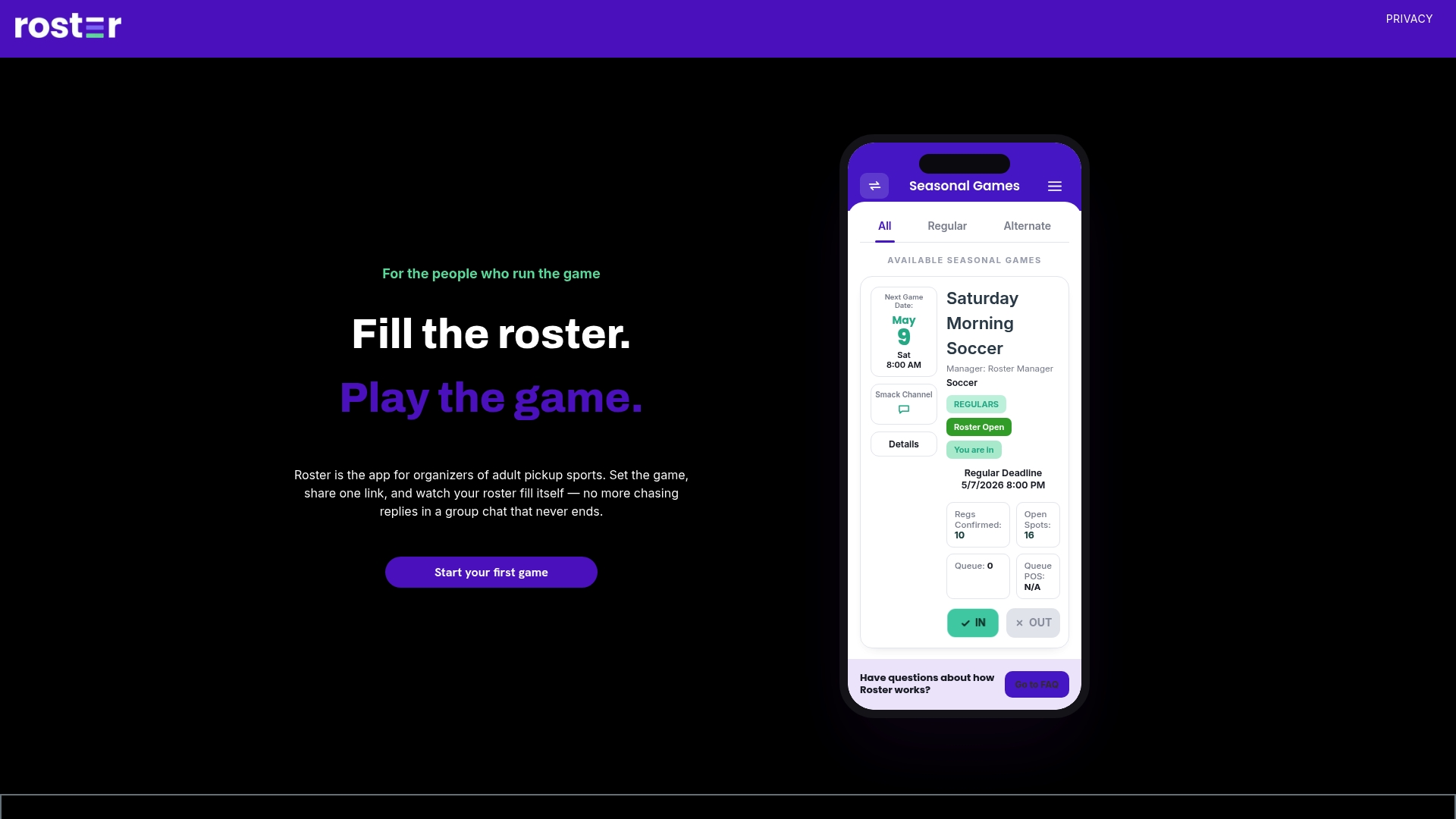
If your group chat has turned into a second job, try Roster for your next game and see how the sign-up flow works.
FAQ
Should I just tell everyone to mute the chat?
Muting helps the individual but can hurt the group. Mannell notes that muted chats can mean missed information, and players end up dipping in and out to check what matters. A better fix is to move the important information, like sign-ups and game details, out of the chat so there's nothing critical to miss.
How big should a sports group chat be?
There is no magic number, but research summarized by Mannell suggests people enjoy smaller groups with closer friends most. For a pickup pool, that means separating a core group from a larger list of alternates, and giving each only the messages that apply to them.
How do I get people to stop replying "I'm in" in the chat?
Tell them once, pin the rule, and reply to the first few slip-ups with a link and a short "tap here to lock your spot." People follow the path that is easiest. If signing up in the link takes one tap, most will switch within a couple of games.
What belongs in the chat if logistics move out?
Banter, photos, ride offers, post-game plans and the occasional "UPDATE" message for urgent changes such as weather or a closed field. That keeps the chat worth reading, which is what you want from a group of people who like playing together.
Is chat overload really a problem for casual games?
Yes, especially as groups grow. Research on instant messaging links overload to fatigue and stress, and fatigue to a greater intention to stop using the tool. In a pickup game, people who tune out the chat often tune out the game.
Sources
- Overwhelmed by group chat messages? You're not alone (The Conversation)
- Flooded with too many messages? Sun and Lee, Information Technology & People (ScholarWorks@Korea University)
- SFIA 2024 Trends in Team Sports topline report
- Why so many Gen Zers are saying, 'Play ball!' (Christian Science Monitor)