
An announcement-only team chat is a channel where only the organizer (and any co-managers) can post, and everyone else reads. For an adult sports team, that means game time, field, roster changes and referee fee amounts live in one clean place instead of getting buried under "who's in?" replies. You can build it with a chat space set to restrict posting, or by pairing a one-way channel with a single signup link. Below is how to set it up, what to put in it, and how to handle the money questions (especially splitting referee fees) that always follow.
TL;DR
- Announcement-only means posting is limited to organizers. Players read, react and, if you allow it, reply in threads.
- Post a fixed set of updates: game details, roster changes, weather calls and fee amounts. Keep conversation somewhere else.
- For referee fees, write the rule before anyone pays. Leagues commonly split the fee 50/50 between teams, then divide each team's half by the number of players.
- Decide in advance what happens when someone cancels, joins late or no-shows, and apply it the same way every time.
- Move RSVPs out of chat entirely. One signup link beats counting thumbs-up emojis.
Table of Contents
- What announcement-only chat is, and how it differs from a group chat
- Why organizers move to one-way updates
- How to set up announcements that stay manageable
- What to announce: roster changes, game details and urgent updates
- Splitting referee fees fairly
- When players cancel, join late or miss a game
- Collecting the money without the awkwardness
- Keeping participation high without a flood of texts
- Our perspective
- Run your games from one link
- FAQ
- Sources
What announcement-only chat is, and how it differs from a group chat
A regular group chat is a free-for-all: anyone can post, so a simple field change competes with jokes, side debates and screenshots. An announcement-only setup flips that. Some workplace chat tools now offer announcement spaces where only designated managers post, which creates one-way, controlled communication closer to a bulletin board than a conversation.
The same help documentation explains the details that matter to organizers. In an announcement space, owners or managers can post in the main conversation, respond to comments, or turn replies off. Members can react and reply directly to announcements, depending on the settings you choose. So "announcement-only" is really a dial, not a switch:
| Setting | Who can post | Best for |
|---|---|---|
| Strict broadcast | Organizers only, replies off | Weather calls, field changes, fee reminders |
| Broadcast with reactions | Organizers post, players react | Quick acknowledgments ("got it") without noise |
| Broadcast with threads | Organizers post, players reply inside a thread | Questions about one specific game |
For most adult pickup groups, the middle row works best. A thumbs-up tells you someone saw the message, and nobody has to scroll through 40 replies to find out where to park.
Why organizers move to one-way updates
If you have ever organized a Sunday soccer game, you know the pattern. You post the time. Six people answer "maybe." Two ask about the field. Someone sends a meme. By Saturday night you cannot tell who is actually coming, and the one message that mattered ("we moved to field 3") is 80 messages up.
One-way channels fix a specific problem: findability. Players know that anything in the channel came from the organizer and is current. That is the same logic behind formal leagues, where team managers are expected to disseminate league information, rule changes, announcements and facility details to their players. You are doing the same job on a smaller scale, so give it the same structure.
If you want a deeper look at why chat alone strains under this load, our post on email versus chat for pickup teams walks through it.
How to set up announcements that stay manageable
1. Decide who can post
Keep it to you and one backup organizer. Two people is the sweet spot: someone can always post a rainout call even if you are on a plane.
2. Choose your reply policy
Turning replies off entirely works for short seasons with small rosters. For larger groups, allow threads. Threads keep detailed discussion separate from the main conversation and let members choose whether to follow a thread and how they are notified. That means the person with a question about the Thursday game can follow it without every other player getting pinged.
3. Use a repeatable message format
Players learn to scan a consistent format. Try this:
- Game: day, date, start time
- Where: field name and any parking or entry note
- Status: on, off or weather watch
- Spots: how many open, who is on the waitlist
- Money: amount due and by when
Our one-page communication checklist and templates give you copy-ready versions of these messages so you are not rewriting them every week.
4. Separate announcements from RSVPs
This is the step most organizers skip. If players confirm attendance by replying in chat, your announcement channel stops being one-way. Send RSVPs through a single link instead, and let the announcement channel report the result ("We have 14, two spots open"). If you are still tracking attendance in a spreadsheet, these seven signs it is time to replace your roster sheet will help you decide.

What to announce: roster changes, game details and urgent updates
Formal adult leagues treat roster accuracy as a hard requirement. The Howard County, Maryland handbook says every player must complete the online roster or waiver by the league deadline, that unsigned players are not eligible, and that a team without a complete roster may face forfeiture or disciplinary proceedings. You may not run a league with discipline, but the principle carries over: if everyone knows the roster is final by a certain time, last-minute chaos drops.
A useful split of what goes in the channel:
- Always announce: game confirmed, location or time change, cancellation, roster locked, waitlist player moved into a spot, fee amount and due date.
- Announce sometimes: a reminder the day before, a note about shirt colors, a post-game summary.
- Never announce: debates about lineups, complaints, anything that needs a discussion. Take those to a separate chat or to the field.
Urgent updates deserve a consistent marker, such as starting the message with "UPDATE" or "CANCELED." Players learn quickly that a message with that word is the one to read first.
Splitting referee fees fairly
Referee fees are the money topic that most often lands in an announcement channel, so it is worth getting the rule right. The good news: organized leagues have already worked out the common patterns, and you can borrow them.
The half-and-half baseline
Most leagues split the referee fee evenly between the two teams. The National League states that each team is responsible for one-half of the total referee fees per game, paid in cash or a pre-determined payment method before each game. A youth example from the 2025-26 Florida Soccer league sheet shows the same logic: 13U-14U totals $140 ($70 per team), 15U-16U totals $160 ($80 per team) and 17U-19U totals $190 ($95 per team).
Adult fees vary by format. The Texoma Soccer Association lists an 11v11 total of $200 per game and a 7v7 total of $150 per game, split evenly between teams, with a forfeit if cash is not available at kickoff. Another league page lists referee fees of $100 for three officials, $80 for two and $65 for one. Always check your own league's current schedule, since these change.
From team half to per-player share
Once you know the team's half, divide it by the number of players. BSSC publishes a clear formula for captains: (team fee plus referee fees, which is the number of games times the fee per game) divided by the number of players equals the per-player price. Their example: $1,290 plus $150 is $1,440, divided by 12 players, or $120 each.
Here is a quick worked example for a single game. Suppose the referee total is $150 for a 7v7 match, so your team owes $75. With 10 players present, each pays $7.50. With 8 present, each pays $9.38. That gap is exactly why you need to decide in advance whether the split uses rostered players or attendees.
Some leagues also round for convenience. One referee instruction sheet says each team pays half and suggests you round up $1 to even split if desired, which saves everyone from fumbling for change.

Write the rule down before anyone pays
A sound approach, common among organizers, is to separate costs by type:
- Fixed team-wide costs (league fee, equipment): split equally among rostered players.
- Per-game costs (referees for that game): split among the players who actually play.
- Optional costs (post-game food, extra jerseys): charge only the players who opt in.
Post that in your announcement channel at the start of the season and pin it. If you want to see how the same thinking applies to field rental, our guides on splitting field costs fairly and on what pickup soccer really costs to run include worked numbers.
If your group wants to ease the per-player burden, a team fundraiser can offset fees. This guide to planning a team candy fundraiser covers how to set one up so the money has a clear purpose before you collect it.
When players cancel, join late or miss a game
This is where most disputes start, and the fix is the same: pick a rule, publish it, apply it every time.
A workable default:
- If a player cancels before the roster locks, they owe nothing for that game and the waitlist fills the spot.
- If they cancel after the lock and no one replaces them, they owe their share, because the cost was already committed.
- If someone joins late, they pay the same per-game share as everyone else for the games they play.
- If the game is canceled for weather, announce it right away and state whether any collected money carries over or is returned.
Leagues handle this the same way, just with more formality. The Howard County handbook states that payment of officials is the forfeiting team's responsibility, and the non-forfeiting team is refunded its portion when fees were collected up front. Bethpage Soccer's guidance says the non-forfeiting team must still pay its share when the other team does not appear. The Hoboken Adult Soccer League sets a $30 referee fee per team before the game and a $60 full fee for a forfeiting team. The South Coast Referee Association policy also covers collecting fees before the match and refund treatment for weather cancellations.
You do not need a rulebook that long. You need two or three sentences that everyone has read.
Collecting the money without the awkwardness
Pick one payment method
Cash on the sideline still works for many leagues, but peer-to-peer apps leave a record. BSSC notes that teams should pay referees preferably via Venmo on the field before their game. If you are the one collecting, Venmo's help pages say you can select a purchase, tap Split, choose who to include, adjust amounts and send requests. Recipients must accept before money moves, and you can track and remind from the pending section.
Venmo's group feature adds another option: members can add expenses, and Venmo splits them into amounts due, lets you customize amounts or exclude members, and works out the fewest payments.
Keep amounts private and money traceable
Post the rule and the total in the announcement channel, but send individual amounts privately. Nobody needs to see who is behind. Keep a simple record of who paid, how much and when.
Collect early where you can. The Howard County handbook recommends collecting team money before the registration deadline and notes that players who pay up front are generally more committed.
For larger pooled funds, take a lesson from youth soccer. AYSO Region 76's policy says team funds should be paid to the region rather than directly to a coach or administrator, which protects both players and the person running things. For a casual pickup group the equivalent is simple: never let your own account become a mystery. Share the running total whenever someone asks.
Keeping participation high without a flood of texts
A quiet channel only works if people still show up. A few habits help:
- Make the next step obvious. Every game announcement should include the signup link, so players do not have to ask how to join.
- Post on a schedule. If the game post always goes out Monday at noon, players check Monday at noon and stop pinging you.
- Show open spots. "Two spots left" gets action. "Who's in?" gets silence and maybes.
- Acknowledge fast. When a waitlisted player moves in, say so. People stay engaged when they see the system working.
- Give chatter a home. Create a separate social chat for banter and make clear it is optional. Your announcement channel stays clean, and players still have a place to talk.
If you run more than one group, multi-team scheduling can cut the admin and the no-shows across all of them.
Our perspective
We built Roster because we watched organizers burn their weekends on logistics. Most of them were not struggling with the game. They were struggling with the thread.
Our view is simple: an announcement channel only works if the thing that fills the roster is not the chat. When RSVPs, waitlists and spot counts run through one shared link, the chat can go back to being what it should be, a place for the few messages that matter.
That is how Roster is designed. You set the game details, share a single link, and the app handles real-time roster filling and the waitlist for dropouts. It also tracks payments between players and managers through Venmo, so the fee conversation does not have to live in a group text. The point is more time on the field and less time on the phone.
Daniel
Run your games from one link
If you are tired of counting replies, Roster is built for adult pickup organizers. Set the game, share one link, and let the app fill open spots and manage the waitlist as players drop out or join in.
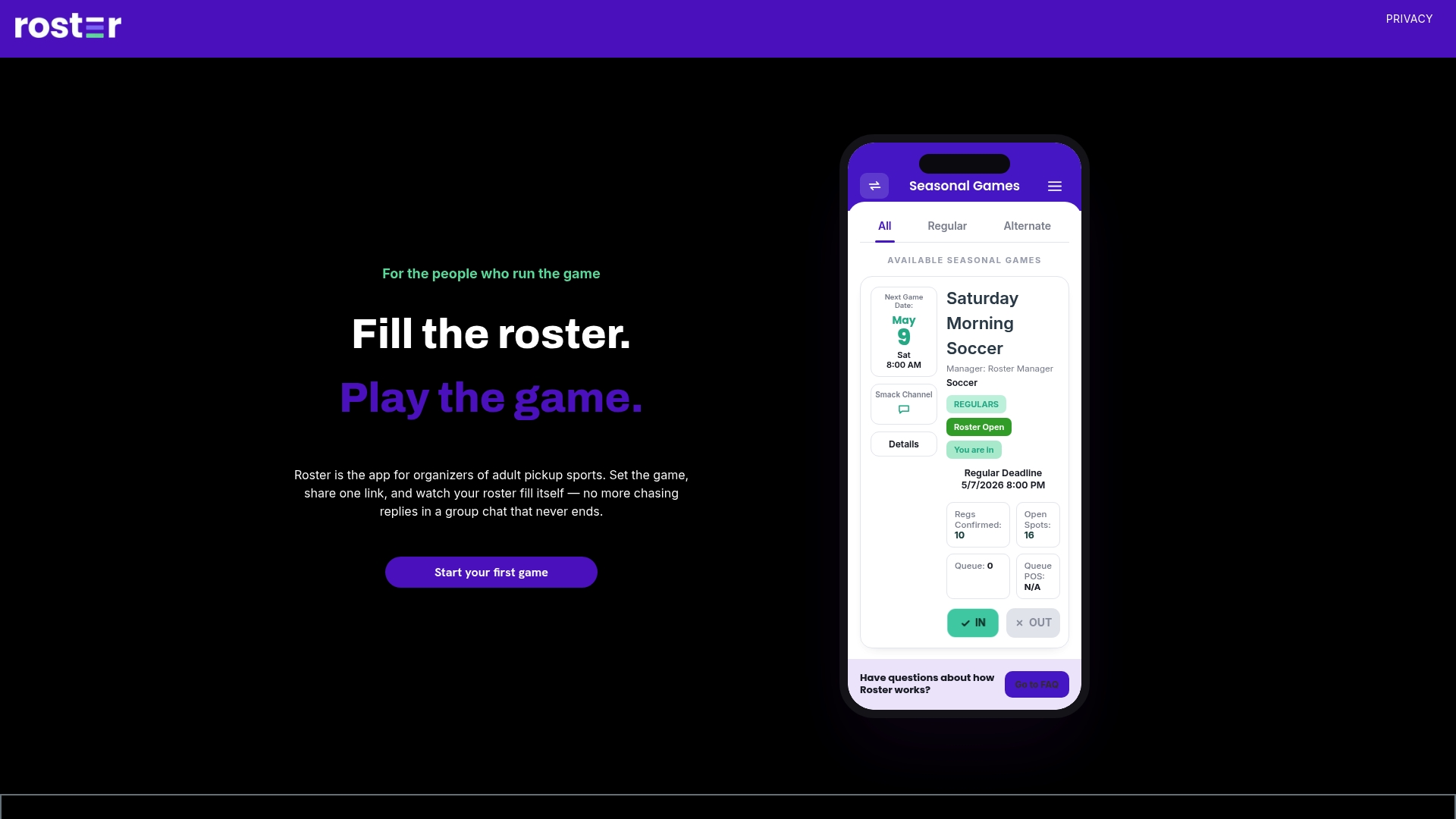
It also supports regulars and alternates, group chat for the messages that matter, and Venmo payment tracking between you and your players. See how it works at Roster.
FAQ
Can players reply in an announcement-only chat?
It depends on how you set it up. In tools that support announcement spaces, managers can turn replies off or let members react and reply. Many organizers allow reactions and threads so players can confirm they saw a message without clogging the main feed.
How should a team split referee fees?
Start with the league's rule, which is often half the total fee per team. Then divide your team's half by the players who are playing that game. Publish that rule before the season starts so there are no surprises.
What if a player cancels after paying their share?
Decide this in advance. A common approach is to refund if the spot is refilled from the waitlist and keep the share if the cost was already committed. Whatever you choose, apply it to every player the same way.
Should I post fee amounts in the whole group?
Post the total and the rule publicly, but send each player's own amount and due date privately. That keeps the announcement channel clean and avoids singling anyone out.
Sources
- Announcements in Google Chat, Google Workspace Updates
- Learn about spaces, Google Chat Help
- Adult Sports Team Managers Handbook, Howard County Recreation & Parks
- Sports Info for Teams, BSSC
- Referee Assigning & Payments, The National League
- 2025-26 FSPL Referee Fees
- Texoma Soccer Association Adult League Rules
- Rules and Fees, West Coast Adult Soccer League
- Referee instruction sheet, GotSport
- Bethpage Soccer, Travel Coaches Referee/AR Fees
- Hoboken Adult Soccer League Rules
- SCRA Policies & Guidelines, South Coast Referee Association
- Splitting & Sharing Purchases, Venmo
- Managing Expenses for Venmo Groups, Venmo
- AYSO Region 76 Team Expenses Policies
- Sports Team Candy Fundraiser: How to Plan One That Works